Mendix 发布 – 11.17

- 2026 年 11 月 25 日
- 阅读分钟
此 Mendix 11.17 release brings significant updates across AI development, process orchestration, and cloud operations. This month’s highlights include smarter, more proactive suggestions from Maia Make, the public beta of Maia Operate for streamlined incident analysis, and new process orchestration learning paths. Additionally, this release introduces React Native 0.88 support, a modernized JavaScript Action Editor with LSP, and expanded enterprise configuration options.

代理应用程序和编排
Process orchestration and learning paths
With the rapid rise of Agentic AI, the power of deterministic process handling has become more critical than ever. But with so much innovation happening across Mendix’s process orchestration capabilities lately, staying fully up to date can feel like a challenge.
That makes right now the ideal moment to dive into both the updated Workflow learning path and the brand-new Dynamic Case Management (DCM) learning path to get completely up to speed on what Mendix has to offer for modern process automation.
此 Workflow learning path has been refreshed for LTS 11.12, packed with updated best practices and powerful new features. Here are some of the key highlights you’ll explore:
- Workflow groups: Streamline user assignment and target user tasks efficiently to the right teams while keeping membership easy to manage.
- Message events and event sub-processes: Handle asynchronous communication and complex, unpredictable exceptions or interruptions smoothly.
- AI-assisted development and AI agents: Accelerate your process creation and weave autonomous decision-making directly into your execution flows.
Whether you’re looking to brush up on core workflows or exploring the LA release of DCM to support unstructured, ad-hoc business processes, now is the time to explore the latest possibilities in the Mendix 学院.

New Authentication possibilities for OpenAI-Compatible Connectors
我们已经升级了 OpenAI 连接器 to support dynamic authentication methods alongside static ones. Previously, there was only the possibility to store a static token such as an API Key during configuration. Now, you can set the authentication type to ‘microflow’ and select one that returns the required HTTP headers on demand. This powerful addition unlocks native OAuth support and simplifies integration with enterprise LLM gateways. The new authentication method was implemented for OpenAI-compatible provider configurations like 寒冷西北风, 谷歌双子座和 Azure Foundry and can be used when building your own connector了。
GenAI Resources now alert you before you run out of GenAI Units
GenAI resources power the agents and AI features in your apps, so running low on GenAI Units should never come as a surprise. Until now, the only way to know how close a resource was to its monthly allocation was to open the 消费 选项卡中 Mendix Cloud GenAI portal and check. On a busy team, that check is easy to forget.
With overage alerts, every Mendix Cloud GenAI resource now has a 技术联系方式: the person on the team who receives notifications about that resource. When provisioning a resource, you choose who that is. After that, a Company Admin or the current Technical Contact, can reassign the role at any time from the resource’s 团队 标签。
The Technical Contact is notified at two moments that matter:
- At 80% of the monthly allocation: they receive an early warning that the resource is approaching its limit.
- At 100% of the monthly allocation: they’re notified that the limit has been reached.
Your team can see these alerts in the portal at-a-glance. The 80% warning gives you time to act: a Company Admin can increase the resource’s GenAI Unit capacity in Control Center, and the increase takes effect immediately. Your agents and AI features keep running without interruption, and nobody has to keep watching a dashboard.
要开始,请打开 团队 tab of each GenAI resource and check that the right person is set as Technical Contact. 阅读文档
智能体开发
Maia Make: Smarter, more proactive workflow suggestions
如果你使用 Maia Make inside Studio Pro to accelerate your development—whether spinning up domain models, microflows, or UI—you already know how much time it saves. And yes, Maia could already build workflows for you, but it required quite an explicit nudge. You probably had to spell it out in your prompt, adding “build me a workflow for…” or explicitly tagging your request to use process orchestration.
Now, we are making Maia significantly smarter.
我们更新了 Maia so it can recognize business prompts that naturally call for process orchestration. If your prompt describes multi-step processes, user assignments, or exception handling, Maia will now proactively evaluate whether a workflow is the right fit and suggest or generate one —without you having to explicitly ask for it.
这对你来说为什么重要?
We know that as a Mendix developer, workflows aren’t always the first thing on your mind for everyday logic. But from a platform perspective, we believe that bringing structured, deterministic processes together with your data, logic and UI yields the most robust, scalable applications.
That’s why we’ve instructed Maia to think a step ahead. Even if you just throw a general business prompt its way, it now actively considers whether a workflow is the best tool for the job.
Give it a try on your next prompt and let Maia surprise you by bringing enterprise-grade process orchestration naturally into your build.

Speed up your (AI-assisted) development with Instant Auto-Layout for microflows
当您使用 Maia Make to generate microflows, getting the logic onto the canvas was half the battle. Historically, the AI had to spend valuable cognitive capacity and processing time figuring out how to arrange activities, sequence flows, and layout the canvas neatly.
To solve this, we’ve decoupled layout generation from Maia’s core reasoning. Maia can now automatically invoke a dedicated auto-layout engine when generating your logic. By taking layout calculation completely off Maia’s plate, we’ve reduced overall microflow generation time by 30% to 40% in our testing, leaving you with clean, readable logic quickly.
Auto-layout is now at your fingertips
We didn’t stop at AI generation. You can now trigger this powerful auto-layout capability directly from the 画布上下文 菜单 whenever you want to tidy up a microflow yourself.
Less waiting, cleaner logic structures out of the box, and a quick way to keep your canvas clean—whether Maia built it or you did.
This feature is currently released as “试验” and is enabled by default so you can experience the speed boost right away. We’d love to hear what you think, so please share your feedback! If you ever want to turn it off, you can easily do so in your settings.

Maia Make is now faster and more efficient
Maia Make now runs on Claude Sonnet 5.5. We also changed how Maia Make works under the hood with a new approach to build and change your app model.
这对您意味着什么:
- 更快的发展: Maia Make needs fewer steps to finish a task. You spend less time waiting and more time building.
- Lower token use: Maia Make does the same work with effort. Each request costs fewer Maia units, so your allowance goes further.
- Nothing to set up: The change is automatic in Studio Pro 11.17. You use Maia Make 和以前一样。
在我们的测试中, Maia Make in 11.17 is up to 3x faster and uses about half the tokens compared to 11.16.
Maia Operate: from “something is wrong” to “here is why and what to do”
Maia Operate is now in public beta! When something goes wrong in your Mendix Cloud app, Maia tells you what is happening, why, and what to do about it, in minutes. It reads your logs, metrics, alerts and platform events for you, so you no longer have to piece the story together across different pages.
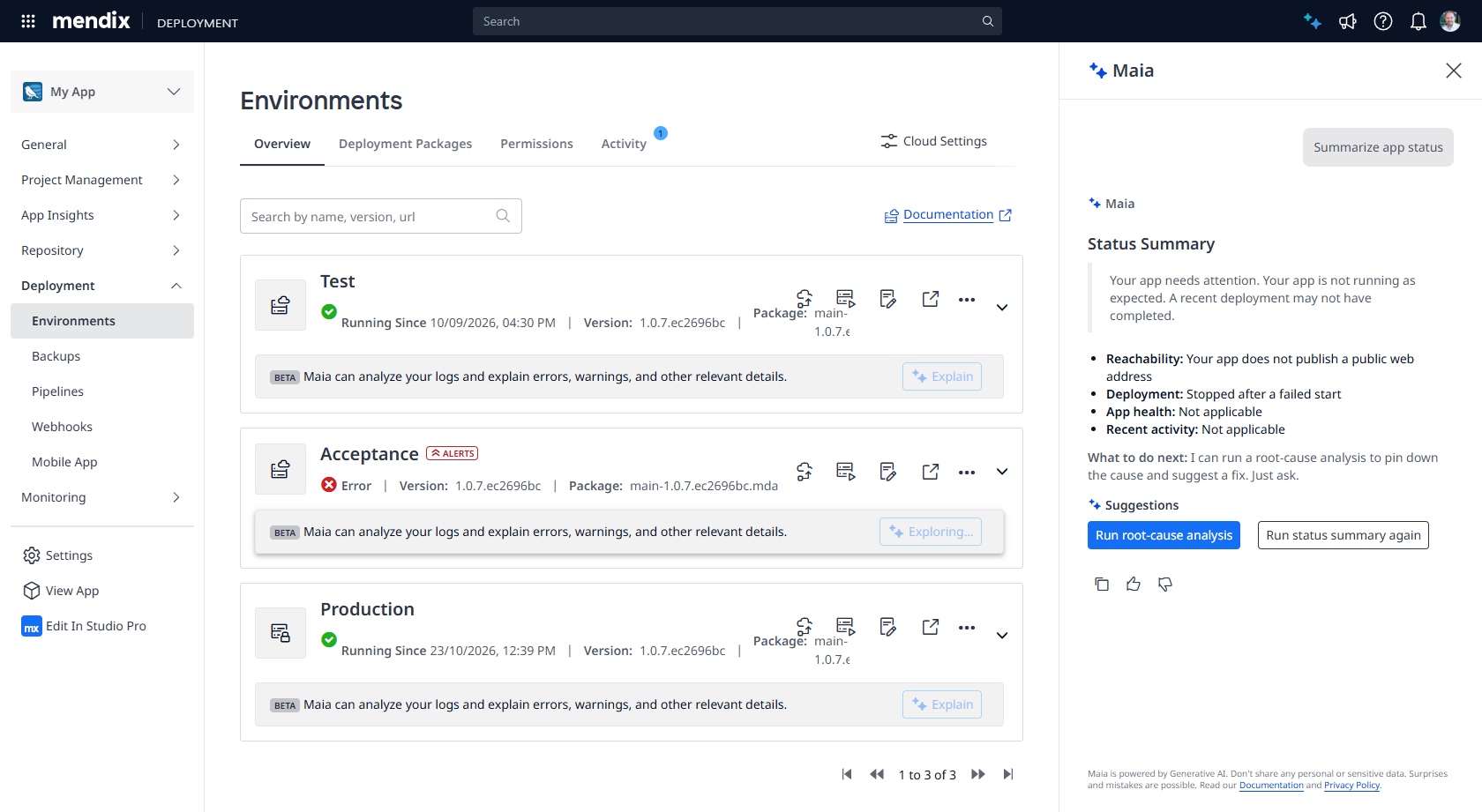
点击 说明 ,具体采用了 环境 page of your app to start a Maia session for your environment. From there, Maia helps in several steps:
Know what is happening: status summary
Maia reads the logs, metrics, alerts and platform events of the environment and gives you a short summary in plain language. It covers multiple aspects of your app, such as reachability, app health and recent activity, and says whether your app needs attention. You do not need to go through the logs, metrics and alerts yourself.
Understand why: root cause analysis
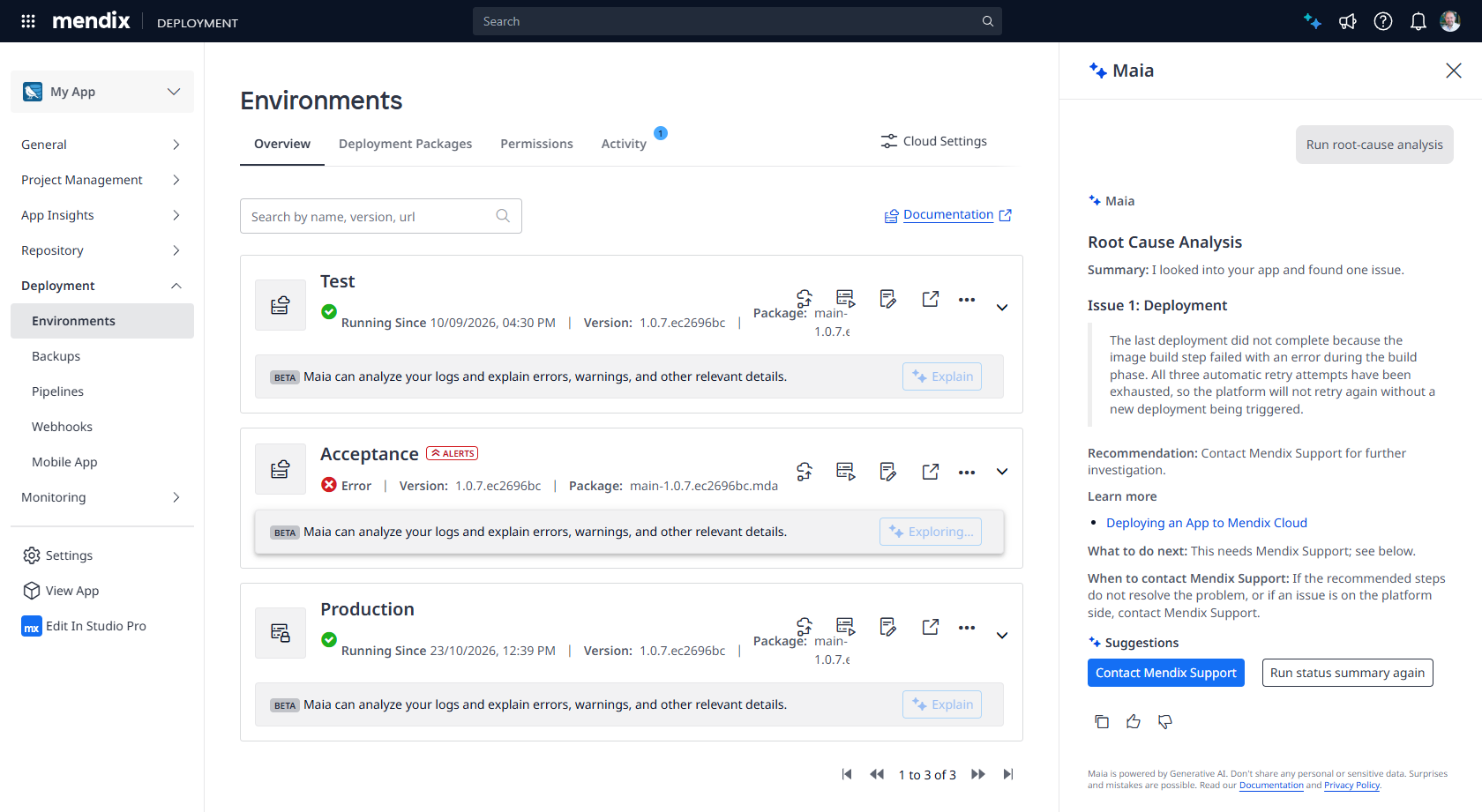
If the summary shows a problem, choose Run root-cause analysis. Maia investigates the environment and tells you the most likely cause in plain language. It shows the evidence behind its conclusion, such as the log line it found, so you can check the reasoning instead of taking it on trust.
Understand why and what to do: root cause and recommendation
If the summary shows a problem, you can choose to run a root-cause analysis. Maia investigates the environment and tells you the most likely cause in plain language, together with a recommended fix: concrete steps and links to the relevant documentation. If the steps do not solve the problem, or the issue sits on the platform side, Maia tells you when to contact Mendix Support. You carry out the fix yourself, the way you do today.
什么是 Maia Operate helps with
Maia Operate can help you with the operational incidents that cost DevOps teams the most time on Mendix 云计算:
- Deployments and builds: a build that fails or gets stuck, or a deployment that never completes.
- App will not start or keeps crashing: startup failures, crash loops, and environments waiting for a service, such as the database, to become ready.
- Memory problems: out-of-memory crashes, memory leaks, and high memory usage.
- App unreachable: DNS problems, timeouts, and certificate issues.
Where the cause is on the platform side, Maia says so and tells you when to contact Mendix Support, so you know right away whether the fix is yours or MendixS.
这对你意味着什么
Maia gives DevOps engineers who manage Mendix 上的应用 Mendix Cloud a head start on incident resolution, by taking over the groundwork that takes the most time: summarizing status, finding the likely cause and recommending a fix.
- Less downtime, lower cost: Working out why something broke is usually the longest part of an incident. Maia shortens that step, so you start fixing sooner and get your app back up sooner. Every minute of downtime you avoid is a minute of lost business and support load you do not pay for.
- More time to build: Collecting clues across logs, metrics and Portal pages is time engineers do not spend developing. With Maia doing the groundwork, they can spend more of it on new features and the value those bring to your business.
您保持控制 - Read-only in this beta: Maia analyses and recommends. It does not change your environments.
- Your permissions apply: Maia can only see what you are allowed to see.
- Sessions are recorded: Each Maia session is logged in the Activity tab of your app, so you always see who used Maia on which environment, and when.
接下来会发生什么?
Resolutions are coming soon. Maia will help you carry out the fix itself, not only recommend it, with you staying in control of what it is allowed to do.
可用性
Maia Operate is available in public beta for Mendix Cloud environments, at no extra cost during the beta. Read the documentation for setup details and supported scenarios. We would love your feedback on how accurate and useful the analysis is, so let us know!
Stay ready for new iOS and Android versions with React Native 0.88
Mobile operating systems change every year, and native apps need a current foundation to keep working reliably on them. Apple, for example, requires the new scene-based lifecycle starting with the iOS 27 SDK, and apps built with Xcode 27 without it fail to launch. Staying on supported technologies keeps your apps compatible with new devices and OS versions and keeps future updates small and manageable.
Building on the foundation from 11.12, Mendix 11.17 upgrades native mobile apps to 反应本机 0.88. The Native Template, platform-supported modules, and widgets are updated, including support for the iOS 27 scene-based lifecycle and up-to-date Android build tools. Since 0.84, React Native has added a new animation backend, comprehensive edge-to-edge fixes for Android 15 and later, variable font support, and event handling that follows web standards. React Native 0.88 itself has no user-facing breaking changes.
This release is a steppingstone to the next LTS release, Mendix 11.18 in December. We encourage all customers to move to 11.18 for the best long-term support of their native apps. Native apps on an LTS version are supported for 15 months. You can use 11.17 for early verification: try your app on React Native 0.88 and check that your custom JavaScript actions, widgets, and modules work as expected, so you are ready when the LTS arrives. Learn more in the native mobile support guidelines.
Modernized JavaScript Action Editor with Smart Code Assistance
Writing JavaScript code inside Mendix applications requires developers to remember available APIs, manually format their code, and manage imports themselves. This can interrupt development flow and increase the chance of mistakes. With the growing complexity of JavaScript actions, developers need better tooling that helps them write code faster and with greater confidence.
To improve the coding experience, we have modernized the JavaScript Action Editor by adding Language Server Protocol (LSP) support. The editor now provides intelligent code autocompletion while you type, helping you discover available APIs and reducing the need to memorize function names. It also formats your code automatically to keep it clean and consistent. In addition, required imports are now added automatically, helping you avoid common import-related errors.
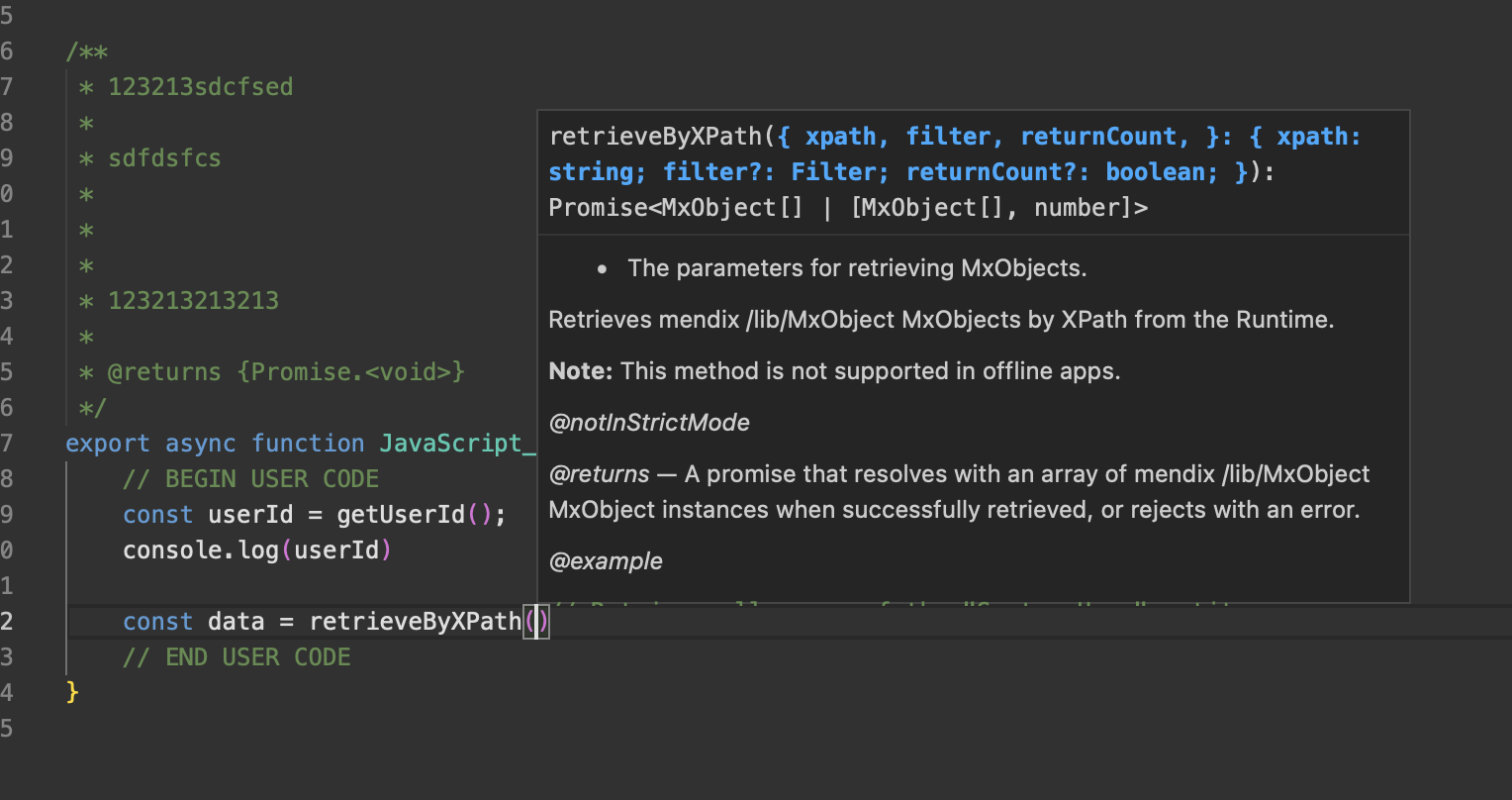
No configuration is required. Simply open a JavaScript action in Studio Pro 11.17 and start coding to benefit from the new capabilities.

A simpler Close action for pop-up pages
When users close a pop-up with the close icon, you often want something specific to happen, such as saving or discarding changes. Until now, this required adding a button to the pop-up just to define the close behavior. That made setup indirect and limiting, and pop-ups harder to model and maintain, especially when different situations needed different close behavior.
Mendix 11.17 lets you configure the Close action property of a pop-up page directly with a regular client action, just like any other action in your app. This is more flexible and works like the rest of your app, and you can call a nanoflow for more advanced behavior. New pop-ups use it by default. Existing pop-ups keep working, and many are converted automatically when you update your project.
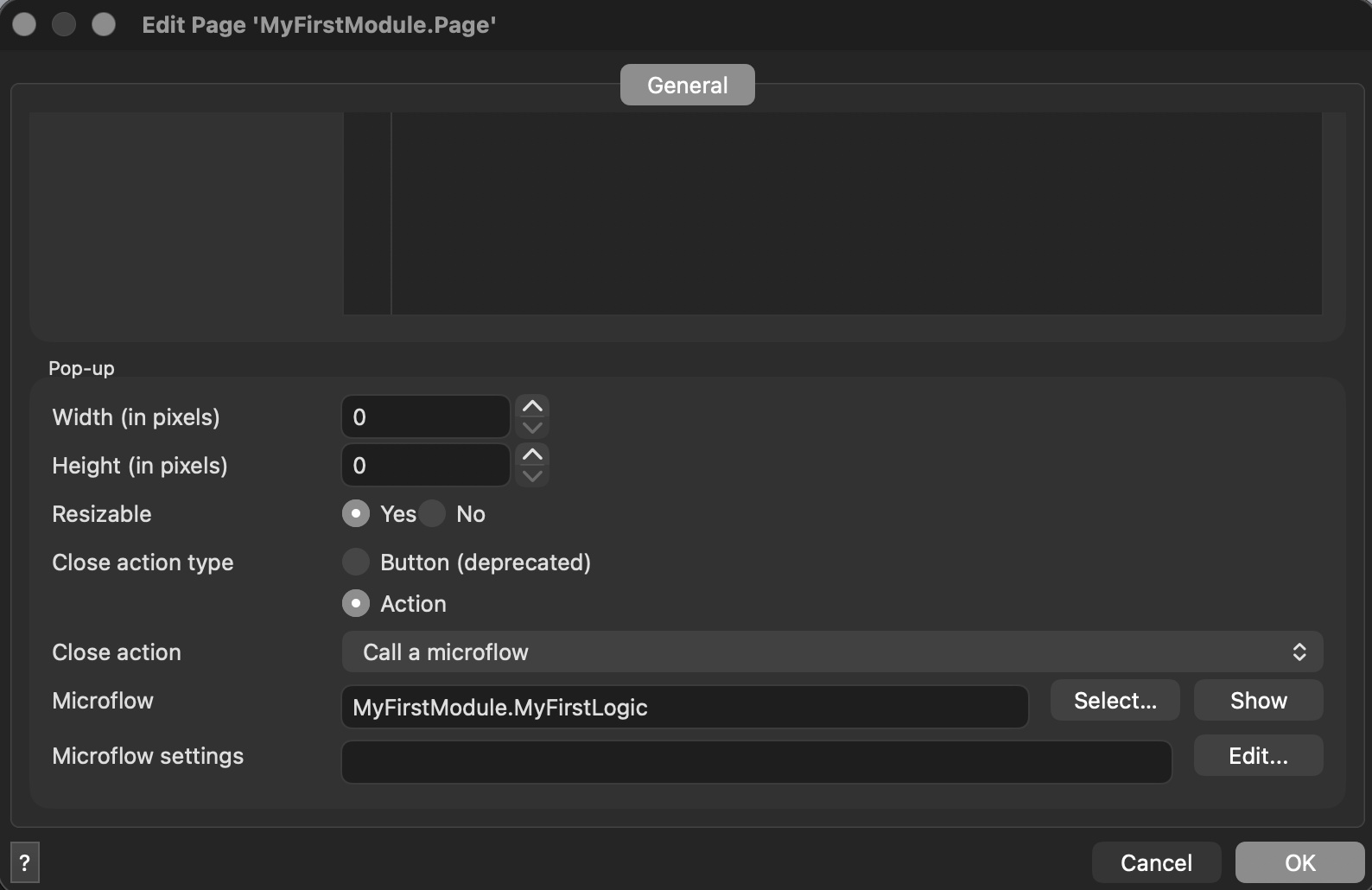
The previous approach of referencing a button is now deprecated, and we encourage all developers to migrate to the new Close action. To learn more, including how to convert existing pop-ups, 查看文档.
Primitive parameters for Snippets
Snippets now accept primitive parameters such as strings, Booleans, integers, decimals, dates and enumerations, just like pages already do. Until now, passing a simple value into a snippet meant creating a helper entity only to hold it. Now you can pass a title, switch between view and edit mode, show or hide a section, or hand over an ID for the snippet’s data grid to retrieve its data directly.
When you use the snippet, you map each parameter from a variable or an expression, in the same way you pass parameters to pages and microflows. Your snippets become easier to reuse, and those helper entities can finally go.
企业级平台
Keep your apps compliant: the new “Company Approved” Marketplace policy
In Mendix, you can already curate Marketplace components, (e.g. a system architect decides which ones are safe to use). Now you can enforce that choice.
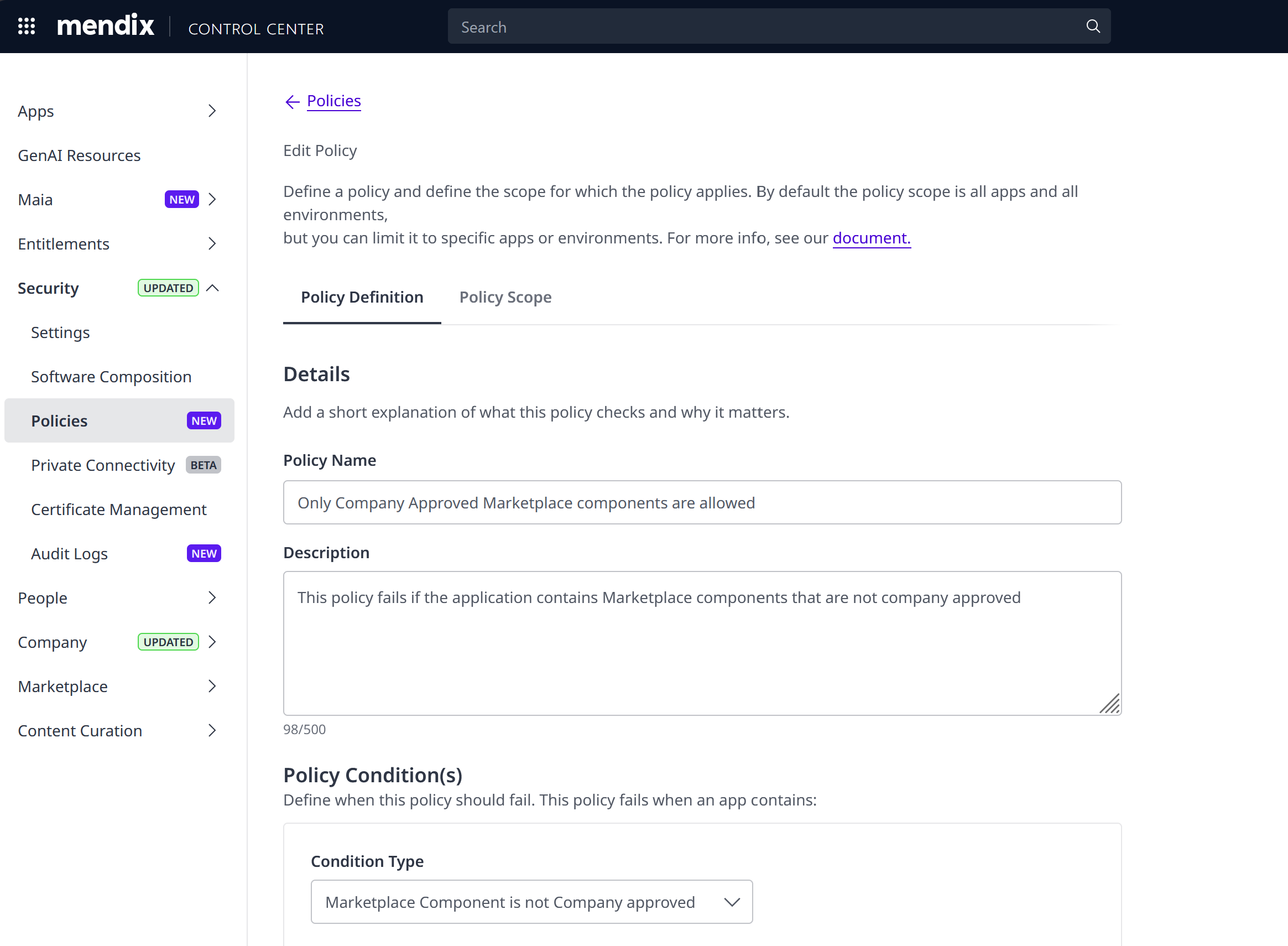
With the new policy in 控制中心, developers get a warning whenever their application contains a component that is not approved. Admins can check which apps violate these policies, gaining insight over the Marketplace components used across their landscape.
To get started, curate your approved components, then create the policy from the template in Control Center – Policies. Give it a try and let us know what you think.
指南针 – Maia Maturity Assessment Assistance
Maia now guides you through the Maturity Assessment in Compass
Need help with a question during the Maturity Assessment? Maia clarifies it, asks relevant questions, suggests a maturity level, and explains why. A summary is saved to your notes, so you never lose the thinking behind an answer.
Build more complete deployment workflows with Mendix 管道
Mendix Pipelines helps teams automate application deployment. Until now, however, each type of pipeline step could only be used once within a pipeline design. This limited how teams could structure more complex processes, particularly when integrating multiple external tools or deploying applications to several environments.
With the release of duplicate pipeline steps, you can add multiple instances of steps to a single pipeline. For example, you can configure several POST and GET requests to interact with different testing, quality, and security tools, or add multiple deployment steps to deliver the same application package to different environments.
This gives developers and DevOps teams more flexibility to automate their complete delivery process without splitting related activities across separate pipelines.
Mendix Event Broker: Send business events to your own Kafka cluster with Kafka Bridge
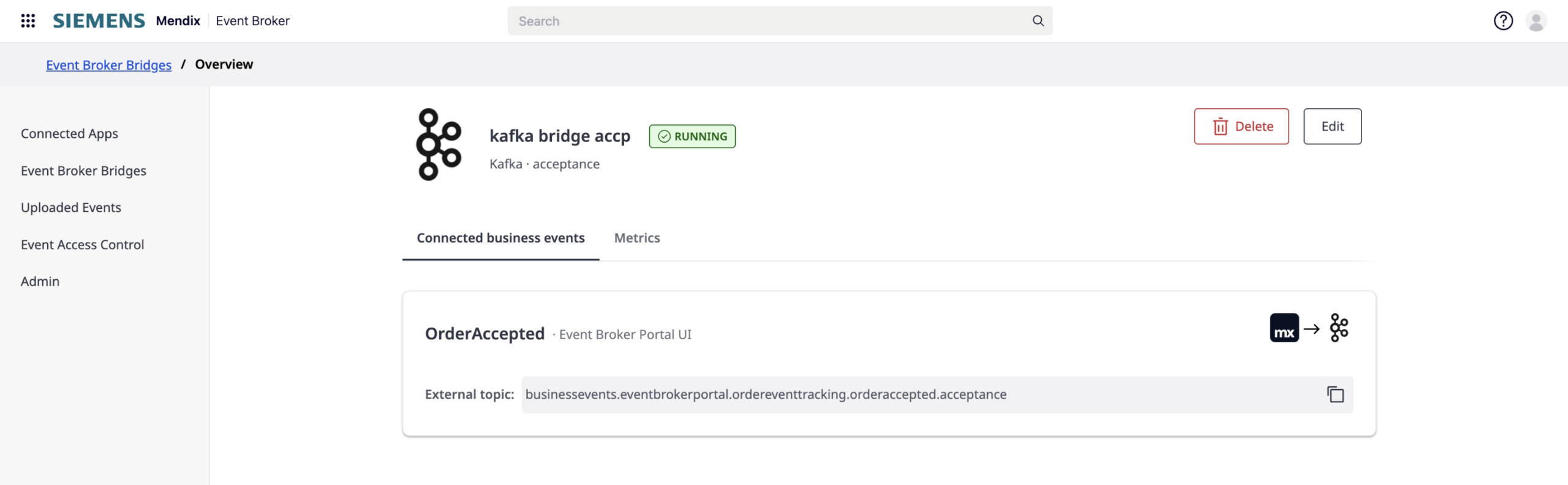
此 事件代理 portal now offers a Kafka bridge that forwards business events from Mendix Event Broker to topics on your own Kafka cluster. Picture a manufacturer with many plants, each running its own on-premises Kafka cluster with devices and edge nodes connected to it. A central Mendix app can publish an event, such as an accepted production order. With a bridge per plant, that event lands on the plant’s own Kafka topics, where its edge nodes and devices already listen. The plants keep their local Kafka setup.
You choose which business events each bridge sends and the Kafka topic each one goes to, and the portal shows the status of the bridge and its connected events in one place. The bridge works in one direction, from Event Broker to Kafka, and supports SASL SCRAM SHA-512 authentication.
Change Data Capture: Custom authentication settings for Bring Your Own Kafka
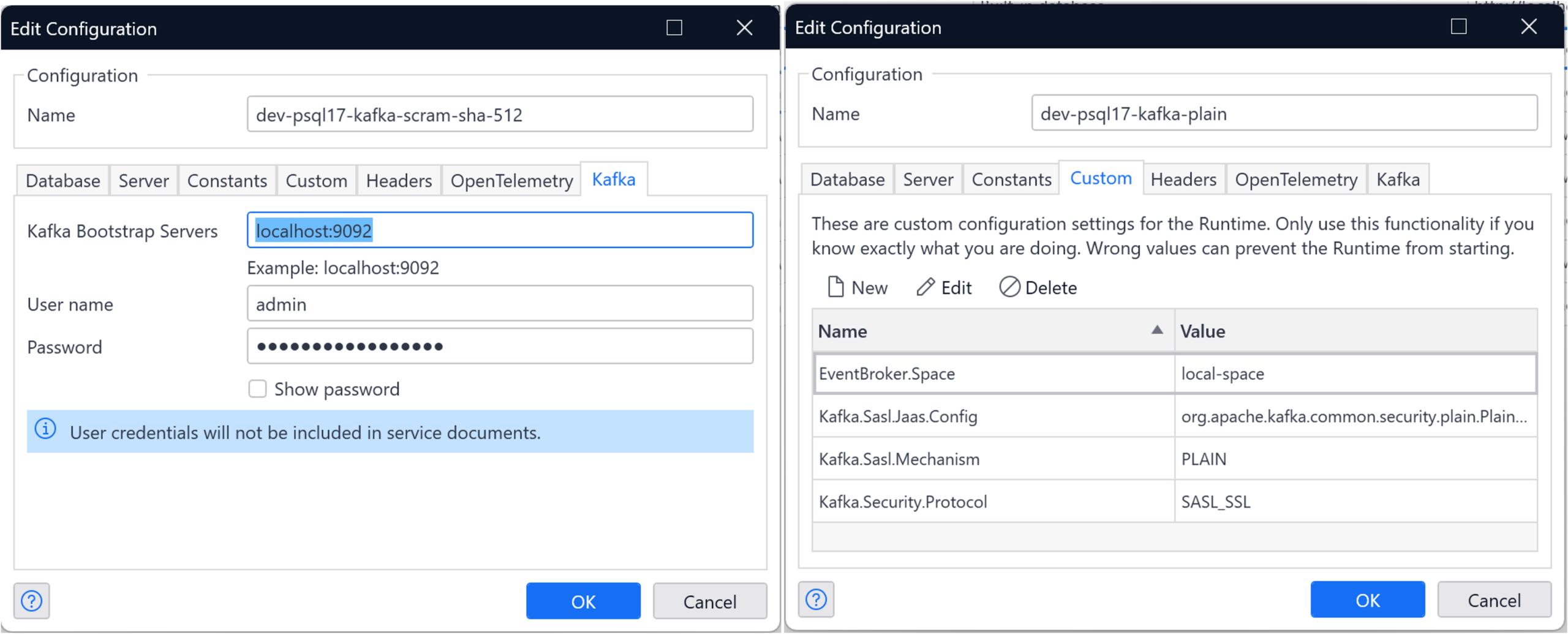
If you use Change Data Capture (CDC) with your own Kafka broker, connecting to the broker used to mean adding runtime settings by hand. Studio Pro now has a dedicated 卡夫卡 tab in the app configuration where you enter your broker address and credentials. This makes it easy to try and test CDC against a local Kafka broker before you deploy.
Brokers are not all set up the same way, so the connection is no longer limited to one authentication method. By default, Studio Pro signs in with SCRAM-SHA-512 over TLS, which is what Mendix Event Broker uses. If your broker requires something else, you can configure the security protocol and SASL mechanism yourself, including the JAAS configuration that goes with it. That lets you connect to the broker your organization already runs, whatever its security setup.
准备好将你的下一个创意变成一款应用程序了吗?
- 通过构建愿景来启动您的项目 Maia Plan.
- 下载 Mendix Studio专业版 并使用 Maia Make 将您的计划转化为应用程序。
- 详细了解所有功能、改进、修复等 Mendix 11.17 发行说明。
- 不想错过未来的更新? 订阅我们的博客 以便获取最新消息