Link Your Mendix AI Agent to a Snowflake MCP Server


Key takeaways
- MCP gives Mendix AI Agents a standardized, governed way to interact with enterprise data and business logic — not just answer questions.
- Snowflake-managed MCP servers let you expose only the data operations you want your AI agent to perform, without building custom connectors or deploying extra infrastructure.
- A well-crafted system prompt is just as critical as the technical setup — it’s what tells your agent which tools to use, when, and how.
- This Mendix + Snowflake combination delivers low-code speed with enterprise-grade data access, making it a strong pattern for teams already invested in both platforms.
As enterprise AI moves from experimentation to real business use, one challenge keeps coming up: how do you let AI agents safely interact with business data and processes?
That is where the Model Context Protocol (MCP) comes in.
MCP is an open protocol that standardizes how large language models (LLMs) connect to applications and external systems. In the Mendix ecosystem, this opens up exciting possibilities: AI agents can do more than just answer questions. They can retrieve data, trigger business logic, and interact with enterprise systems in a structured, governed way.
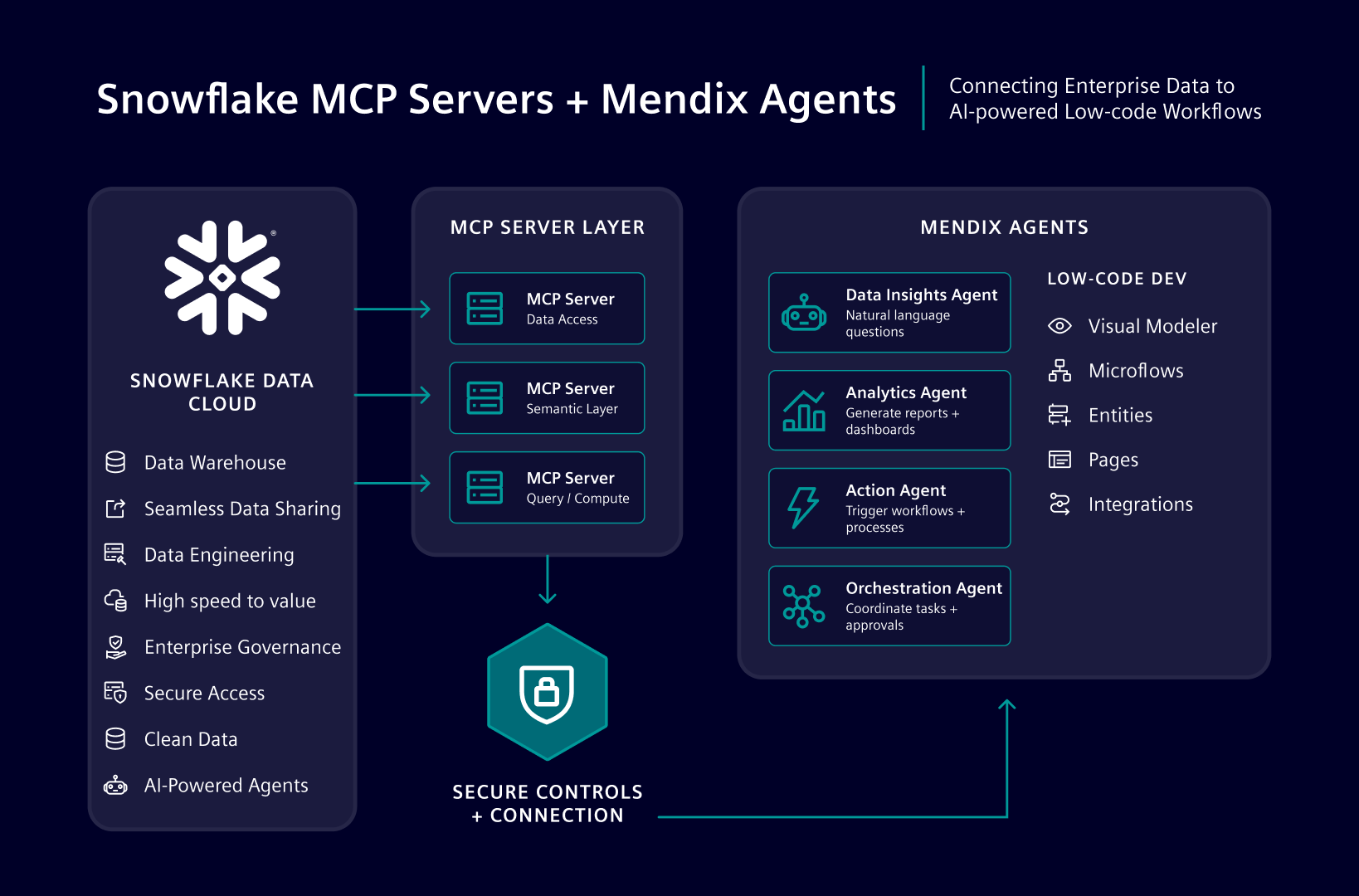
One particularly powerful example is connecting a Mendix AI Agent to a Snowflake-managed MCP server.
Why this matters
Snowflake-managed MCP servers make it possible to expose Snowflake functionality directly to AI agents without deploying extra middleware or separate server infrastructure. Instead of building custom connectors from scratch, developers can configure a secure integration that allows a Mendix AI agent to work with data and logic already available in Snowflake.
This means a Mendix AI agent can:
- Retrieve records from Snowflake using natural language
- Insert or update data through guided interactions
- Reuse existing stored procedures as AI tools
- Support task-oriented business workflows with enterprise data in the loop
In practical terms, you can create experiences such as:
- A support chatbot that retrieves and updates ticket data from Snowflake
- An internal assistant that reuses stored procedures for operational tasks
- A conversational interface for inspecting schemas, querying records, or triggering logic
In short: less glue code, more useful AI.
What you need to get started
To establish the connection, you can begin with either the Blank GenAI App or the Agent Builder Starter App in Mendix.
You will also need:
– The MCP Client module (If you already use the module, make sure it is updated to version 3.1.0 or newer)
– The Conversational UI module
– A configured Snowflake-managed MCP server
– A service-type Snowflake user
– A Programmatic Access Token (PAT) for authentication (OAuth will work as well)
How the setup works
Prepare the Snowflake-managed MCP server
On the Snowflake side, you:
- Set up the database and schema
- Create stored procedures that will be exposed as MCP tools
- Create the MCP server object in Snowflake
- Configure network rules and policies
- Create a service-type user for Mendix
- Generate a PAT or set up OAuth for secure authentication
The stored procedures act as the “skills” your AI agent can use. For example, the documentation shows procedures for:
- Retrieving schema metadata
- Retrieving records from a table
- Inserting records into a table
These are then exposed as tools through the Snowflake MCP server.
This is an elegant pattern: instead of giving the AI unrestricted database access, you expose only the actions you want it to perform. Think of it as giving the agent a well-organized toolbox instead of the keys to the whole warehouse.
Example use case: support ticket management
The sample setup in the documentation uses a support ticket table in Snowflake. The AI agent can:
- Inspect the schema
- Retrieve high-priority tickets
- Insert a new ticket based on a user request
For example, a user could ask:Which tickets have high priority?
The agent can then call the relevant MCP tool, retrieve the data from Snowflake, and respond in natural language.
This makes it much easier to build conversational enterprise apps where users interact with structured business data without needing to write queries themselves.
Connecting Mendix to Snowflake
Once the Snowflake MCP server is ready, the Mendix side is fairly straightforward.
In Mendix Studio Pro, you create or update your app and configure the MCP Client to connect to the Snowflake endpoint. Authentication is handled by creating a microflow that adds the Snowflake PAT as a Bearer token in the request header.
You then configure the consumed MCP service with details such as:
- A service name
- The Snowflake MCP endpoint
- Protocol version: ‘v2025-03-26‘
- Timeout settings
- The credentials microflow
If everything is configured correctly, Mendix validates the service and shows the server status as available. From there, you can inspect the available MCP tools and attach them to an AI agent.
The role of the system prompt
One of the most important steps is configuring the AI agent’s system prompt properly. Why? Because even a capable AI agent needs clear instructions on:
- Which schema and table to use
- What each tool does
- When to call which tool
- What constraints apply to inserts or retrievals
The example system prompt in the documentation is a strong pattern to follow. It tells the agent exactly how to use tools such asget_schema_metadata,retrieve_records, andinsert_record, and includes practical rules like omitting auto-generated IDs during inserts.
This is a good reminder that successful enterprise AI is not just about model quality. It is also about clear tool design, scoped access, and precise prompting.
Benefits for enterprise development
Connecting a Mendix AI Agent to a Snowflake-managed MCP server brings several advantages:
- No separate infrastructure required for the MCP server
- Secure access through Snowflake authentication and network policies
- Reusable business logic through stored procedures
- Faster development with Mendix modules and configuration patterns
- Better governance by exposing only approved tools and operations
For enterprise teams, this combination is especially compelling. Mendix provides the low-code environment for building conversational experiences, while Snowflake provides governed access to data and logic.
Ready to build something that actually works
This integration shows what enterprise AI should look like: practical, secure, and connected to real business systems.
By linking Mendix AI Agents with Snowflake-managed MCP servers, teams can build assistants that go beyond chat and start taking meaningful action retrieving records, inserting data, and reusing established logic in a controlled way.
If you are already using Mendix for GenAI experiences and Snowflake for data and processing, this is a strong pattern to explore. It combines low-code speed with enterprise-grade data access, which is a pretty nice combo if you ask me.