Mendix Release 11.15

- September 30, 2026
- minute read
Every release moves the needle. Maia can now build, run, and secure your app with significantly less input from you. Workflows get smarter with recurring timer events. Microflows get cleaner with orthogonal layout support. Mobile, offline, security, and Marketplace tooling all move forward in meaningful ways. Here’s a look at everything that landed in Mendix 11.15.
Agentic applications and orchestration
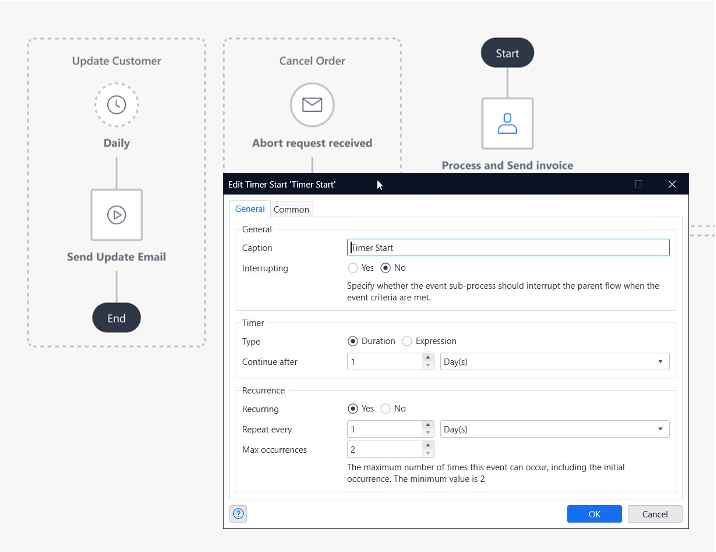
New in Workflow: Recurring Timer events for event sub-processes
Managing periodic tasks within a long-running business process often required “hidden” logic, such as scheduled events or complex microflow loops. To bring this logic directly into the visual model, we are adding Recurrence to the Timer trigger for event sub-processes.
You can now configure a Timer event at the start of a non-interrupting event sub-process to repeat at a specified interval. Much like a non-interrupting boundary event, this allows a specific logic path to trigger multiple times while the main workflow remains active.
Why it matters
- Visual Transparency: By modeling periodic checks (like a daily status update or a 24-hour data validation) directly in the workflow, the logic is clear to everyone. There are no “surprises” or hidden microflows running in the background—what you see is what you get.
- Consistency: This update brings the Timer trigger in Event Sub-processes in line with the behavior of boundary events, making the modeling experience more predictable and easier to learn.
Example: Imagine a Loan Approval workflow that stays active for several days. You can now set up an event sub-process with a recurring timer to run every 24 hours. This sub-process could automatically check for updated credit scores or send a daily reminder to the stakeholder, ensuring the process stays on track without manual intervention or external scheduling.
Maia make me an agent
With the latest release of the Agent Editor, Maia now offers full lifecycle support for Agent documents, allowing you to create, edit, and iterate on Mendix agents entirely through conversation in Studio Pro. Developers can use Maia to quickly refine system prompts and configure tools, significantly reducing the manual overhead of agent engineering.
Beyond Agent documents, Maia can set up all the building blocks your agent depends on such as Models, Knowledge Bases, Consumed MCP services, and Microflow toolN. Lastly, you can even create your own MCP server with Maia by interacting with Published MCP service documents, streamlining how you expose Mendix app logic to the agentic ecosystem.

Agentic development
Maia can now run and secure your app
Maia just leveled up. It can now start and restart your app to test changes as it makes them, configure security and settings, localization, and take on more complex logic, all noticeably faster than before.
That means you can hand off more of the work you’d rather not do. Maia Make inside Studio Pro now closes more of the loop itself, so you spend less time on the plumbing and more on the parts that actually need you.
What’s more, you can now store tool call permissions. This enables you to always allow certain actions, so you don’t have to approve it every time.
Maia can now also create and setup task queues and work through them step by step.
Maia, make me a skill
Maia can now create skills for you, so setting one up no longer means starting from a blank page. Skills are reusable instructions that teach Maia how you want things done, and now Maia can help you write them.
The result is a Maia that gets sharper over time. The more skills you build, the more consistently it works the way you do, and the less you have to explain yourself twice.
Beta: Orthogonal flows in Microflows
Visual clarity is essential for maintaining complex logic. While standard Bezier curves offer flexibility, dense microflows can turn into “spaghetti” layouts that are difficult to parse at a glance.
To solve this, we are introducing Right-Angled (Orthogonal) Flows as a new beta functionality in the microflow editor. Instead of curved lines, sequence flows now follow a clean, orthogonal path, allowing for precise alignment of activities and decisions. This gives you more control over the visual layout, ensuring that your logic looks as organized as it functions.
Why use orthogonal flows?
- Enhanced readability: By eliminating overlapping curves and diagonal lines, the execution path becomes much easier to follow, even in highly complex microflows.
- More control: Activities and decisions can be snapped to a mental grid, reducing visual clutter and making it easier for team members to review your logic.
Try it in beta
As this is a beta feature, we are looking for your feedback to refine the experience. You can now toggle between standard Bezier curves and the new orthogonal flows to see which style best fits. Don’t forget that there is a project default available in the app settings > miscellaneous, if you want it to be your new standard!

Check out the video above to see the new routing in action and how it transforms a complex Microflow into a structured logic map.
History pane support for partial clones
With Studio Pro 11.4 we released the History pane: a non-blocking and searchable alternative for the History dialog. Since then, it has been improved with filtering and the option to trigger a comparison between revisions, but we didn’t manage to make it available to customers using a partial clone…until now.
With this 11.15 release, partial clone users can now also use the History pane. This will automatically work for all places where you can open the history, unless you (previously) set the preference to keep using the blocking dialog. Please note that operations which require picking a revision, such as creating a branch, will still use the history dialog for the time being.
Faster deployments for apps with snippets
Apps that use a lot of snippets now deploy noticeably faster. Until now, every page got its own copy of each snippet it used behind the scenes, which made deployment packages larger and slower to build. Snippets are now packaged once and shared across pages, so the more you reuse them, the more time you save.
Widgets updates
This month brings a set of improvements across our platform widgets.
Rich Text v5: better tables
The Rich Text widget now handles complex tables, including tables nested inside other tables. Behind the scenes we moved to a new editor engine (Tiptap) that is actively maintained and gives us a stronger foundation for future rich text improvements. Existing content keeps working as before, so no migration effort is needed.
Calendar: Year View
The Calendar widget now includes a Year view, showing all twelve months in a single grid with indicator dots on days that have events. Clicking on a day drills down into a view of your choice, making it easy to spot and navigate to events across a whole year.

Markdown: math formulas, subscript, and superscript
The Markdown widget now supports KaTeX for rendering mathematical formulas, along with subscript and superscript text. This makes it a solid fit for scientific and technical content.
Maps v5
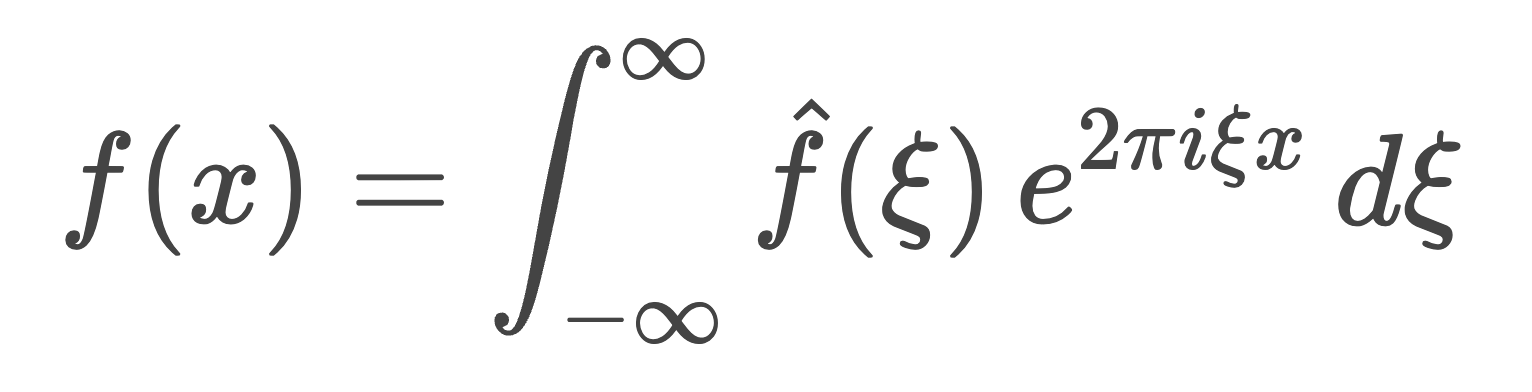
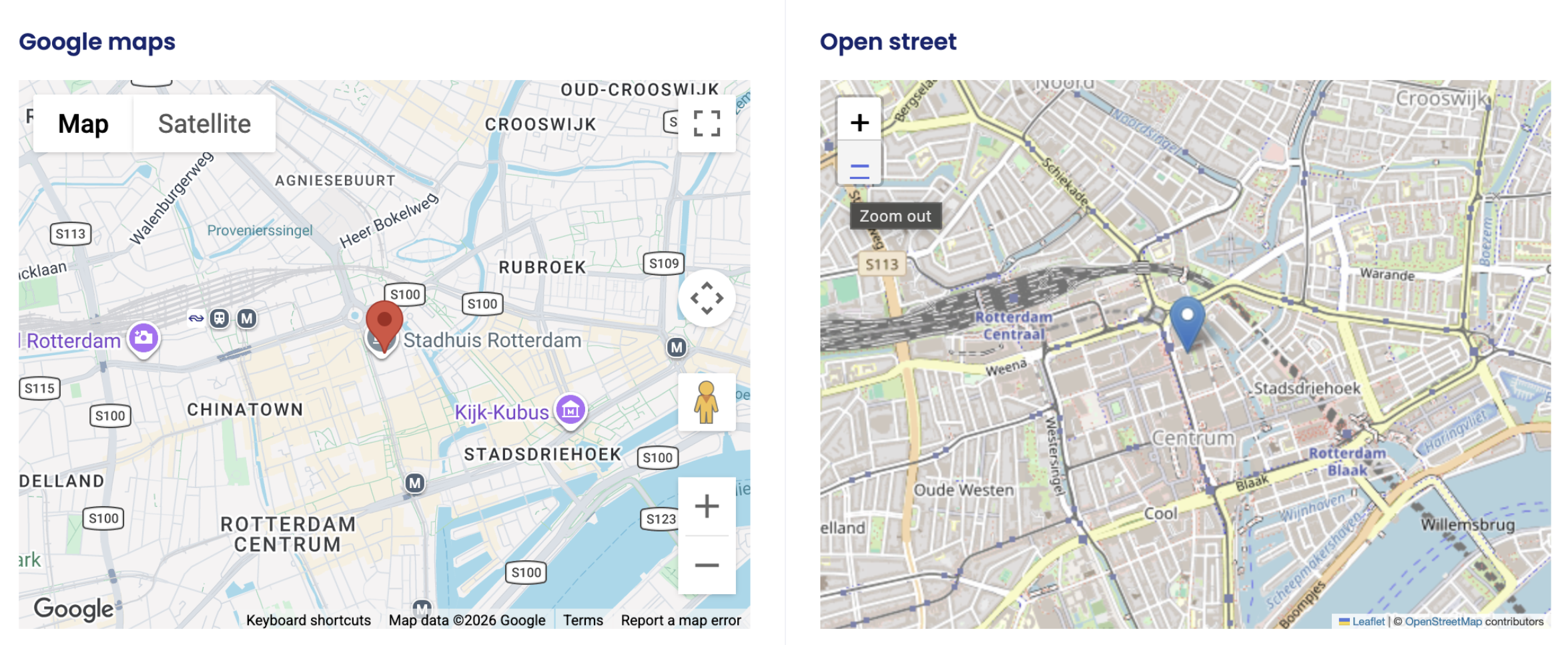
We released version five of the Maps widget, rebuilt from the ground up for better reliability. Markers now show up consistently in every deployment setup, and the new foundation lets us ship mapping improvements faster going forward.
Strict Mode is now enabled by default
Configuring access rules is an important part of building secure Mendix applications. While most applications are modeled correctly, mistakes can happen, and these mistakes can introduce security vulnerabilities that allow data to be accessed or modified in unintended ways. As applications grow in size and complexity, having an extra layer of protection becomes increasingly valuable.
Strict Mode strengthens application security by restricting certain client APIs and ensuring that data access follows the pages, widgets, microflows, and nanoflows defined in your model. This makes automated attacks and scripted access attempts significantly harder, while helping to reduce unintended data exposure caused by security misconfigurations. Read more about Strict Mode in our documentation.
With Mendix 11.15, Strict Mode is now enabled by default and ready for production use. This is an important step toward making secure apps the default experience on our platform. We encourage all developers to review their existing applications, verify compatibility, and enable Strict Mode wherever possible. It is one of the easiest ways to strengthen security and increase confidence that your application behaves exactly as intended.
PWA wrapper gets a major upgrade
Building mobile apps is difficult. Android and iOS come with different ecosystems, technologies, and deployment requirements. App stores require elaborate signing and publishing processes, while user interfaces must adapt to a wide range of screen sizes and device capabilities. That is why we released the PWA Wrapper: to make it easy to transform a Mendix PWA into a native app that feels and behaves like a true mobile application while still providing access to native device capabilities.
This release makes the PWA Wrapper even easier to use and more powerful. The App Builder has been completely redesigned to match Studio Pro’s interface including dark mode support. Common tasks are now organized into dedicated tabs for App Information, Capabilities, Permissions, Signing, and Installation, making the entire workflow more intuitive.
We also added debuggable builds for easier troubleshooting and iOS signing without requiring a Mac. In addition, offline resource support has been expanded, and native behavior has been improved across all supported mobile operating systems. Security and reliability have also been strengthened through improvements to the WebView, native bridge, and the startup process.
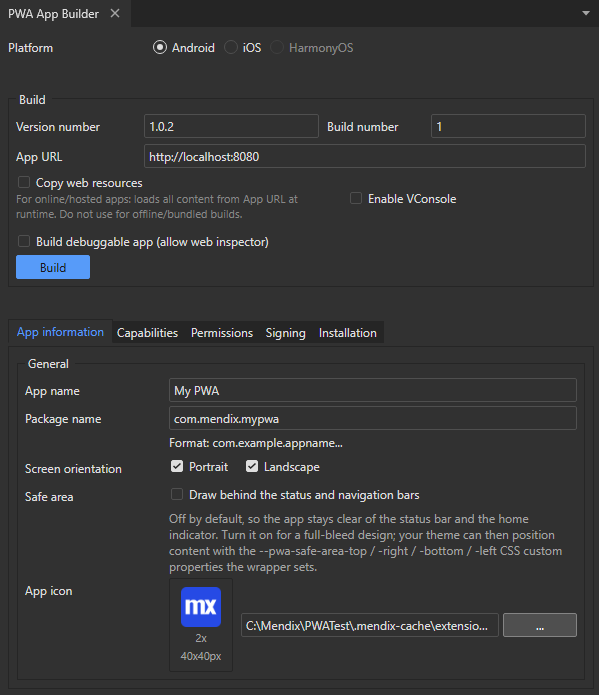
To start using these improvements, update the PWA Wrapper to the latest version. After updating, open the new App Builder and rebuild your application. Existing projects continue to work, while new capabilities such as simplified signing, improved installation workflows, and enhanced debugging are available immediately. This allows you to deliver production ready mobile apps from your Mendix PWA with less effort and a smoother development experience.
Safe background synchronization for offline data
Until now, we did not support running synchronization actions in the background and explicitly warned developers against doing so. If synchronization was triggered in the background while users continued working with offline data, it could lead to unexpected errors and, in rare cases, potential data loss.
With this release, the synchronize unsynchronized objects and synchronize specific objects actions can now safely run in the background, allowing users to continue working while synchronization is in progress. The platform now prevents conflicts between synchronization processes and offline data operations, providing a more consistent and reliable experience.
Important: Background synchronization is not supported for the Synchronize Everything action.
You can read more about background synchronization in our documentation.
Background synchronization is available immediately without additional configuration. This enables more responsive offline applications by reducing interruptions caused by synchronization. To ensure data consistency, operations that modify offline data, such as creating or updating objects, may temporarily fail while synchronization is in progress. By handling these scenarios gracefully, you can confidently take advantage of background incremental synchronization while continuing to provide a predictable offline experience for users.
Enterprise-grade platform
Marketplace release highlights
Continuous security scanning for Marketplace components
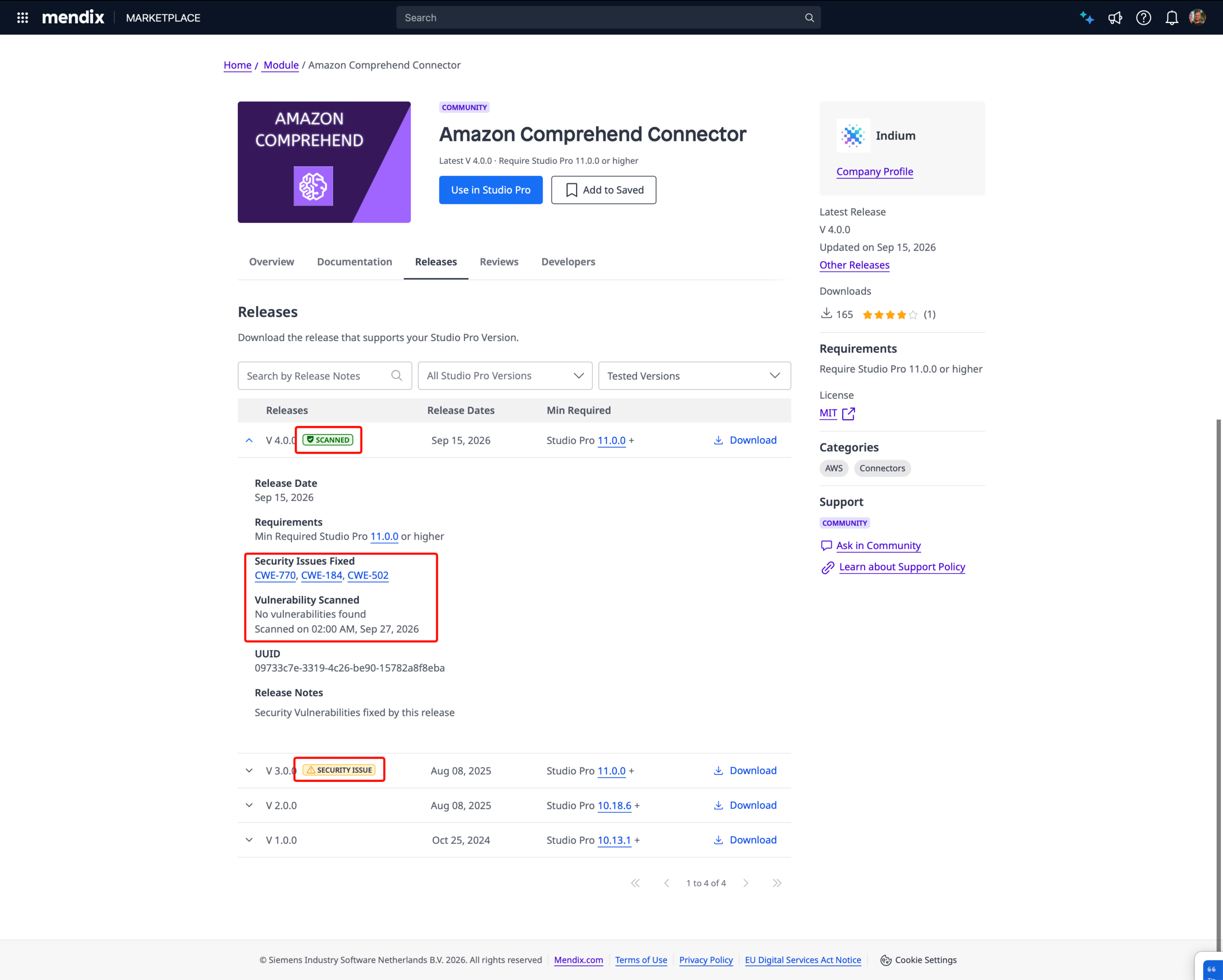
Marketplace components now get scanned for known vulnerabilities every week, not just when they’re first published. Each scan looks at the latest version of every component. When a version comes back clean, a Scanned label appears on that version in the component’s Releases tab, so you can see the check is current.
This matters because security isn’t a one-time event. A component can be completely safe on the day it’s published and then be affected by a vulnerability discovered weeks later. Regular scanning means the security signal keeps up with reality, and you can trust that a Scanned label reflects a recent check rather than a stale one.
When a scan finds a vulnerability, we notify the component’s owner. When the owner ships the fix, they mark that release as a security fix and mark the affected versions, so everyone can see exactly which versions were at risk and which release resolves them.
Know which Studio Pro versions a component works in and request an update
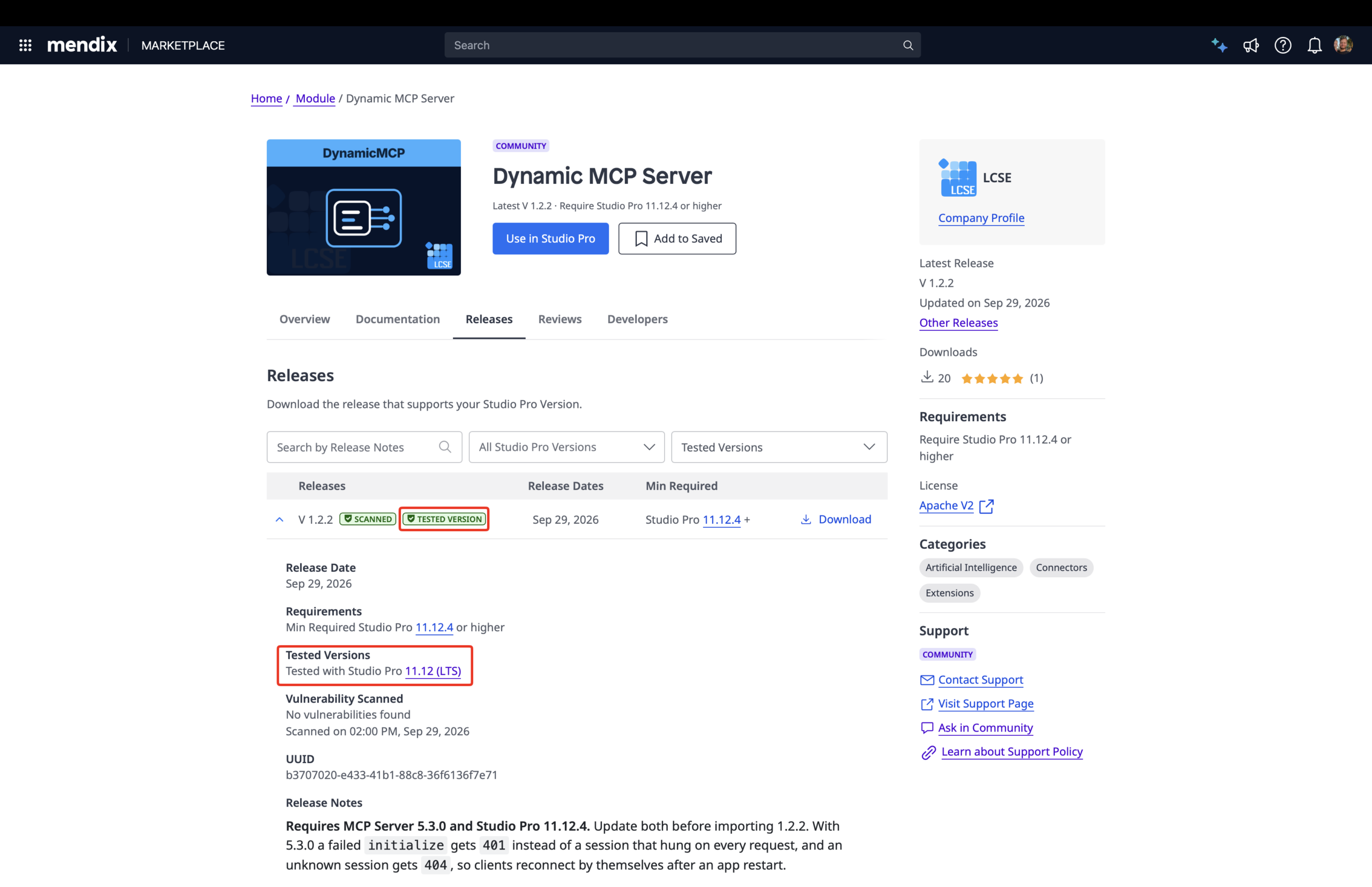
Compatibility just got clearer on both sides. When publishing a component, owners can now mark the Studio Pro versions it has been tested in, starting with 11.12 (LTS). That information is shown on the component, so you can see at a glance whether it’s confirmed to work in the version you use or the version you’re planning to move to. This turns upgrade planning from guesswork into a clear decision.
And when a component isn’t compatible with your Studio Pro version, you’re no longer at a dead end. A new Request Update button lets you email the owner in one click to ask them to update it. You get a way forward, and owners learn exactly which components are holding upgrades back, so they can prioritize the fixes that matter most.
Governance: IAM modules
Improved OpenID Connect compatibility and administration
We’ve made several improvements to the OIDC SSO module to simplify integration with modern identity providers. PKCE is now enabled by default and no longer depends on metadata from the provider’s well-known endpoint, improving compatibility with identity providers such as Microsoft Entra ID and reducing configuration effort.
We’ve also improved the administration interface, making OpenID Connect providers easier to configure and manage. For customers using OIDC SSO module to secure APIs with OAuth tokens, we’ve added support for audience validation, strengthening token validation and helping ensure that access tokens are used only for their intended APIs.
Together, these improvements help organizations adopt modern identity standards with less effort and greater confidence.
Enhanced access management with SCIM
We’ve expanded the SCIM module to support application role assignment during user provisioning and updates. Organizations can now use SCIM attributes to automatically determine which application roles should be assigned to a user as part of their onboarding process.
This allows users to receive the appropriate access before their first login and enables workflow-driven applications to assign tasks immediately after provisioning. By extending SCIM beyond user creation, organizations can automate more of the user lifecycle and better align Mendix applications with their existing identity and access management processes.
More reliable LDAP synchronization
We’ve improved LDAP synchronization to better handle updates to user and group names, preventing duplicate entries when names change. This helps keep directory information aligned across systems and reduces manual administration.
Ready to transform your next idea into an app?
- Kickstart your project by structuring your vision with Maia Plan.
- Download Mendix Studio Pro and use Maia Make to turn your plan into an app.
- Take a closer look at all the features, improvements, fixes, and more in the Mendix 11.15 release notes.
- Don’t want to miss future updates? Subscribe to our blog to catch the latest news