Mendix Release 11.16

- October 28, 2026
- min read
This release pushes the boundaries of what agentic development, workflow orchestration, and enterprise-grade platform management can look like in a low-code environment. Maia graduates from a builder to a true development partner; one that plans before it acts, tests what it builds, and now goes twice as far with every Maia Unit. Workflows gain new flexibility with runtime-managed groups and a new Dynamic Case Management add-on for the processes that don’t follow a straight line. MCP Servers get production-ready OAuth support, the Mendix Cloud gets sharper observability tools, and Mendix Workstation expands its hardware reach on the shop floor.
Whether you are orchestrating jobs across external systems, modernizing your app’s look with Atlas Core 4.6, or using Software Composition to spot which components need attention before Mendix 12, this release gives you more control, more intelligence, and more room to build.
Read on for everything that is new.

Agentic applications and orchestration
Best practice: Let a Mendix Workflow wait for a job in another system
A Mendix Workflow is built for work that takes time. It keeps a process open for days, waits for a user task and picks up where it left off. That holds as long as the whole process lives in your app. The moment one step leaves it and lands in another system, you lose the thread. That system can take hours or days, and it can refuse the work or stall halfway. The same questions then come back in every project. How do you stop a redelivered message from starting the same job twice? How do you notice a job that never returns? And who owns the identifier that ties the request to its outcome?
A new How-To on our Mendix Docs answers those with one reference pattern in three layers. A Domain app orchestrates and holds the business logic. An Adapter manages the communication with the external system, which keeps the integration boundary and its security in one place. The External system does the work. Mendix Business Events carry the traffic between them, over the Mendix Event Broker or your own Kafka.
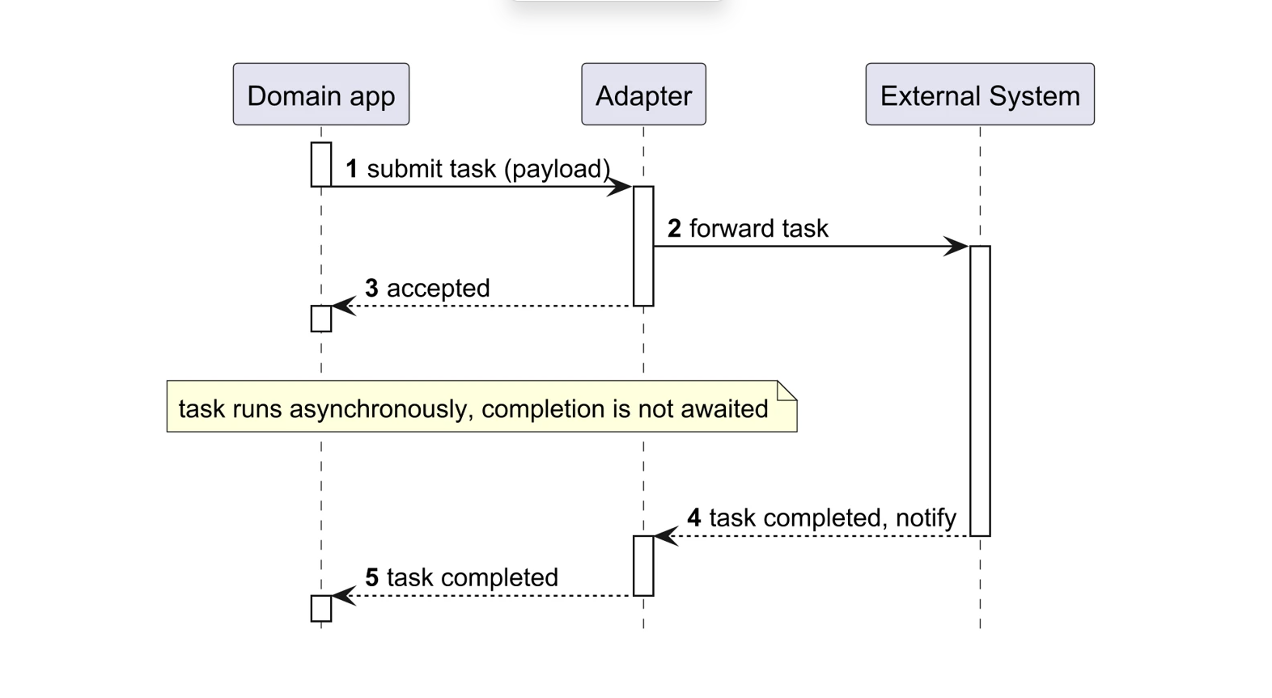
The workflow holds the long-running job, and a non-interrupting timer boundary event escalates when the execution deadline passes. Business Events retries a failed delivery for 48 hours, so keep the processed messages for 96 hours and prune them with a scheduled event. When the other system has no broker and offers REST only, you fall back to one-way calls and build the retries, the buffering and the replay yourself.
New in Workflow: manage workflow groups at runtime
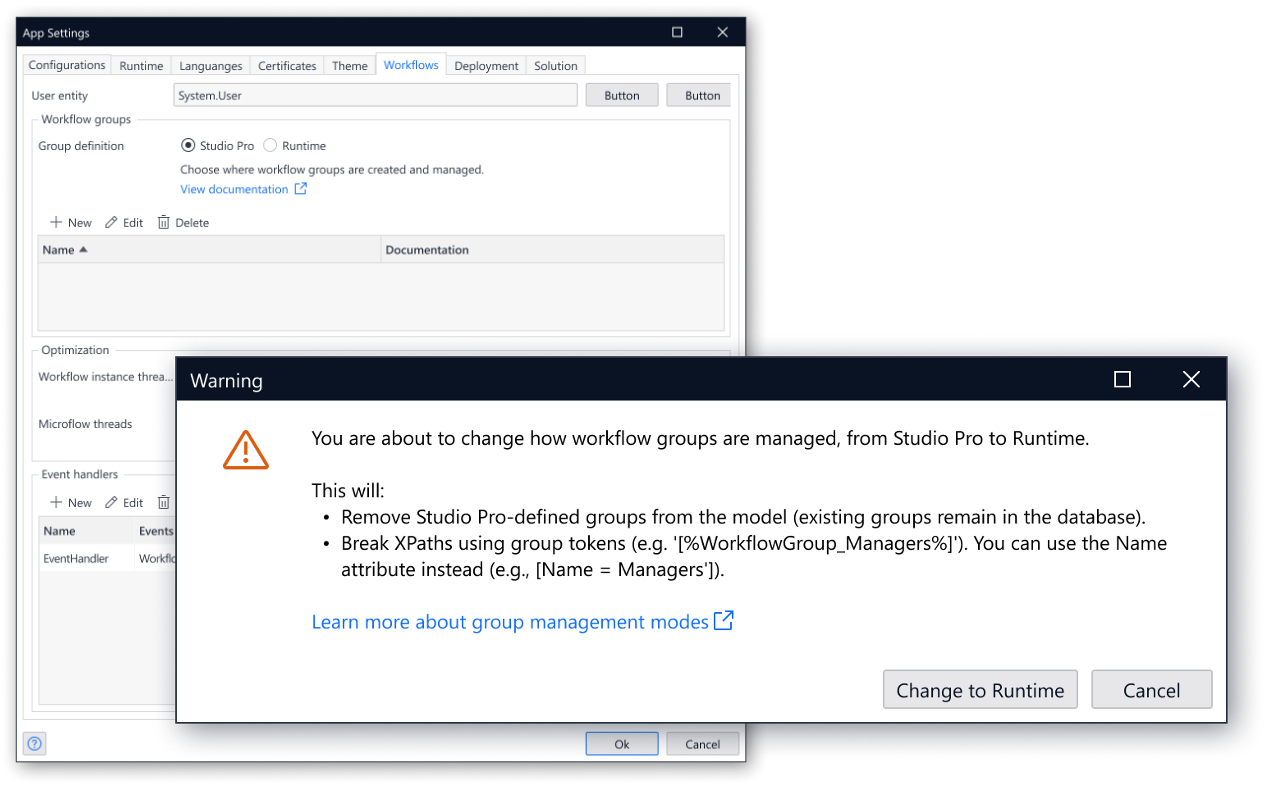
Workflow groups decide who sees a user task. Until now, a developer defined every group in Studio Pro, and the runtime synchronized the model with the database on each deployment. A new group therefore needed a developer, a commit and a deploy.
Now you choose where groups live. App > Settings > Workflow has a new Group definition setting with two modes. Studio Pro is the default and behaves exactly as before. In Runtime mode, Studio Pro no longer defines or synchronizes groups, and administrators create and delete them in the running app through the group management pages of Workflow Commons.
One owner at a time keeps your groups predictable:
- The business stays in control: an administrator opens a group for a new region or a new approval board without a release.
- No name conflicts: only one side owns the groups, so a modeled group and a runtime group can never collide.
Dynamic Case Management: Work that adapts as you go
Mendix Workflows are great for predictable, sequential processes, but some work doesn’t follow a fixed path. Think claims, disputes, investigations. Here the next step depends on the situation and you’ll need something different. With the Dynamic Case Management module now in Limited Availability we bring a fully CMMN-compliant Case Designer right into Studio Pro. Dynamic Case Management is a case management add-on to Mendix by CaseFabric.
Case Management focuses on automation of processes where each process instance is a unique situation requiring real-time automation of interactions among humans, systems and agents, based on process context. It supports scenarios where processes are unstructured or semi-structured and where exception is the norm.
With the add-on now in Limited Availability, you design case models directly in Studio Pro. It uses Pages to define Human Tasks (UI modeling), Microflows for Process Tasks (logic modeling), and the Domain Model to lay out the case file structure with your application’s Entities (data modeling). Your case data stays consistent and manageable that way, and you model the dynamic parts of a case in the Mendix environment you already know.
In addition to the add-on module, we also offer the platform supported Dynamic Case Management Commons module. It holds preconfigured page templates, pages and overviews that save you time during development, and you download it directly from the Mendix Marketplace.

Secure your MCP Servers with OAuth
MCP servers built in Mendix now support the OAuth 2.0 authorization flow from the MCP specification. Configure your authorization server and the required scopes when setting up a Published MCP Service document in Studio Pro or in the Create MCP Server toolbox action. MCP clients then discover where to sign in automatically, obtain an access token, and connect without any credentials hardcoded in their configuration.
Token validation and user mapping stay in your hands. Your existing authentication microflow receives each request, validates the token and returns the Mendix User.
This new feature is available in Agent Editor Extension 2.6.0 and MCP Server 5.4.0.
PS: With this release Maia can now resolve Agent Editor Extension dependencies for you! Try it out, once you’ve enabled Maia for the extension (see First-Time Setup): “Maia, fix my Agents Kit compatibility!”
Agentic development
Maia Make
For agentic development, 11.16 turns Maia from an assistant that builds into one that plans, builds, styles and checks its own work. Maia now agrees a plan with you before it changes your app, tests the UI it builds, fills your app with test data and produces better-looking pages. You can give Maia bigger files (and more of them) and plug your own tools into it. On top of that, every Maia Unit now goes twice as far, and admins can set Maia Units limits for many users at once.
Plan mode: agree on the approach before Maia builds
Until now, Maia started building as soon as you asked. If it misread a requirement, you found out only after your model had changed, and the rework cost time and Maia Units.
With Plan mode, Maia first explores your app without changing anything. It then writes a plan that covers the scope, the domain model, pages, workflows and logic it will create or change, plus risks, assumptions and how the result will be tested. Maia asks questions where your request is unclear. You refine the plan in the conversation, and Maia builds only once you are happy with it.
Plans are saved as markdown files with your app, so your team can review them in version control.

Automated UI testing with built-in Playwright
Maia can now create Playwright UI tests for your app and run them itself. Studio Pro 11.16 ships with Playwright, so there is nothing to install and no MCP server to configure. Maia starts your app, runs the tests and reports the results. Seeing how your running app behaves also helps Maia produce better changes.

Bigger file uploads, more file types
You can now give Maia much more to work from:
- Files up to 5 MB each, up from under 1 MB
- More documents per upload
- HTML, Excel, and CSV files, in addition to images, PDF, and Markdown
That means full specifications, exported pages and spreadsheets can go to Maia as they are, without splitting or converting them first.
Connect to external databases with Maia
Maia can help you work with external databases via the External Database Connector. Ask Maia to connect to a database, and it will set up the connection, discover tables, generate SQL queries and generate entities you need to store the retrieved data.

Maia extensibility APIs
Studio Pro extensions can now extend Maia in two ways:
- Register your own tools: With the Tools API, an extension registers a tool with a name, a description and an input schema. Maia calls it whenever it decides the tool is relevant to the request. This lets you bring company-specific tasks, standards and integrations into Maia.
- Send Maia a prompt: An extension can prefill a prompt in Maia for Maia to execute, so your extension can hand Maia a task.
Every Maia Unit now goes twice as far
Each Maia Unit now covers about twice as much Maia Make work as before. Your Maia Units and limits stay the same; you simply get more done within them. There is nothing to switch on: the change applies automatically for all Studio Pro versions.
Set Maia Units limits for many users at once
Admins can now use bulk actions in Control Center to set Maia Units limits per user for many users in one go. That gives more control over how Maia Units are spread across your developers, with far less clicking.
Maia can now create and edit Java actions
Maia in Studio Pro can now create and edit Java actions for you. Describe what the action should do, and Maia writes the Java code and sets up the action in your app. You can also ask Maia to change an existing Java action. This saves time on building logic that normally requires a few steps and writing Java outside Studio Pro. We recommend reviewing the generated code before using it, as you would with any other change.

Module updates while retaining customizations for older modules
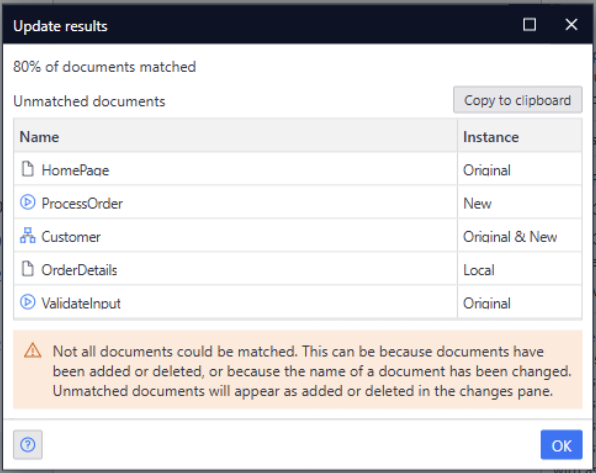
With Mendix 11.13, we released a new feature where modules can update while retaining customizations for modules created in Mendix 11.12 or later. This month we’ve added compatibility for modules created in older Mendix versions as well, which should significantly simplify your upgrade from Mendix 10!
Where modules created after 11.12 are matched on their underlying IDs, for older modules we’re now mapping documents based on their name. If documents couldn’t be matched because they don’t exist in either version, or because they have been renamed, you’ll be informed about this during the process, and both versions will be retained so you can decide what to do.
Capture multiple photos in a single action
Many field service, inspection, and asset management applications require users to capture a large number of photos as part of a single workflow. Until now, users often had to take a photo, process it individually, and repeat the same steps multiple times. This created unnecessary friction and slowed down data collection, especially in mobile scenarios where speed and efficiency are essential.
To address this challenge, we have introduced support for capturing multiple photos in a single camera session. The new Take Picture action allows users to take a sequence of photos without leaving the camera experience. Once finished, all captured images are returned as a list, making it easy to process them within your application.
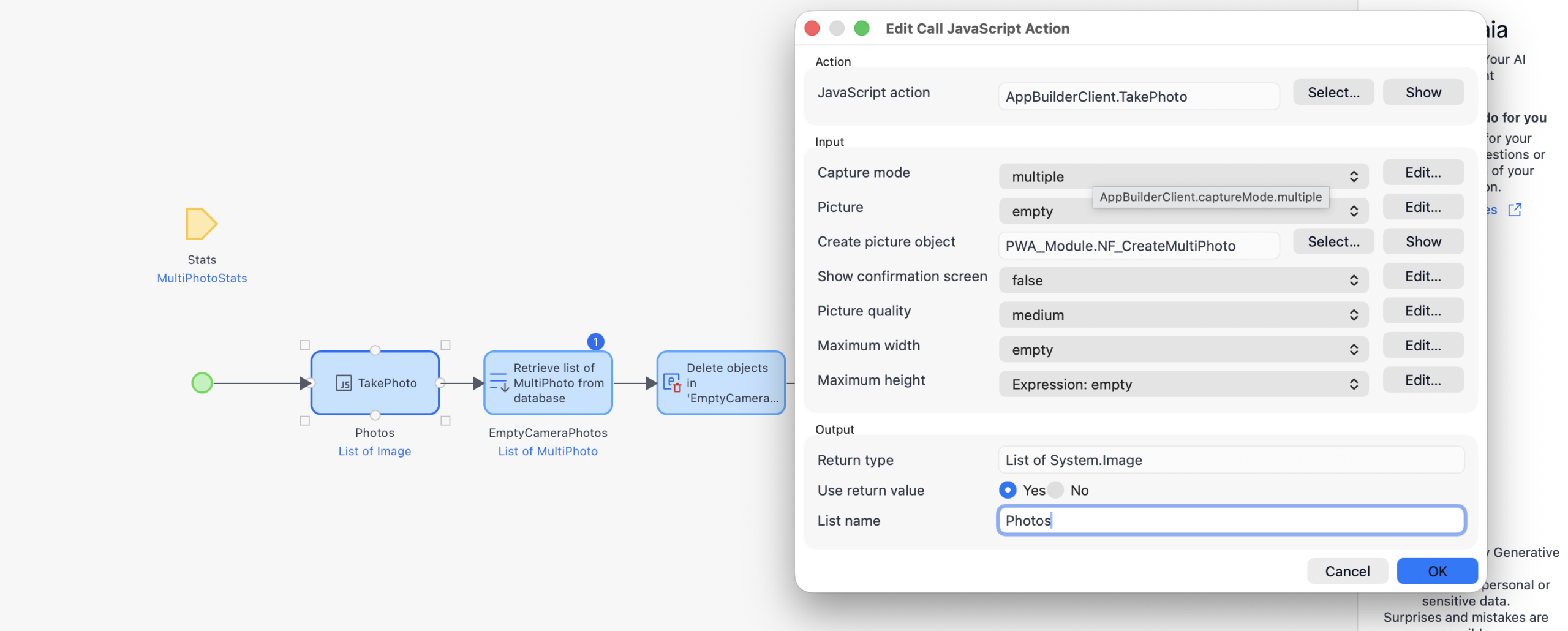
This new feature is available for web applications and is best experienced when running in a PWA Wrapper mobile apps. To get started, use the updated Take Picture action and configure your application to handle the returned image list. We encourage developers to explore this capability to create faster and more flexible photo capture experiences for their users.
Maia Plan
Version and Starter App selection in Maia Plan
Maia Plan now lets you choose where a project starts before it generates the plan. Until now, every Maia Plan project began as a blank app on the latest Studio Pro version. With this release, you set the starting point yourself in the new Project Starting Point step of the Plan & Build flow. You can start on the latest LTS version, which gets long-term support and maintenance, or stay on the latest Studio Pro release. You can also pick a company starter app with a predefined Studio Pro version, as long as that version is 11.12 or later.
When you start from a starter app, Maia builds the plan and the app on your organization’s existing foundation rather than from scratch. Teams that already rely on starter apps to standardize new projects can now use Maia Plan without giving up that baseline. Maia Plan-generated apps start out consistent with the rest of the portfolio, and nobody has to retrofit them afterwards.

A modern, professional look: Atlas Core 4.6
Until now, Atlas colored almost everything with your brand color, from the navigation bards to the page backgrounds and borders. With one strong primary color, apps quickly felt loud.
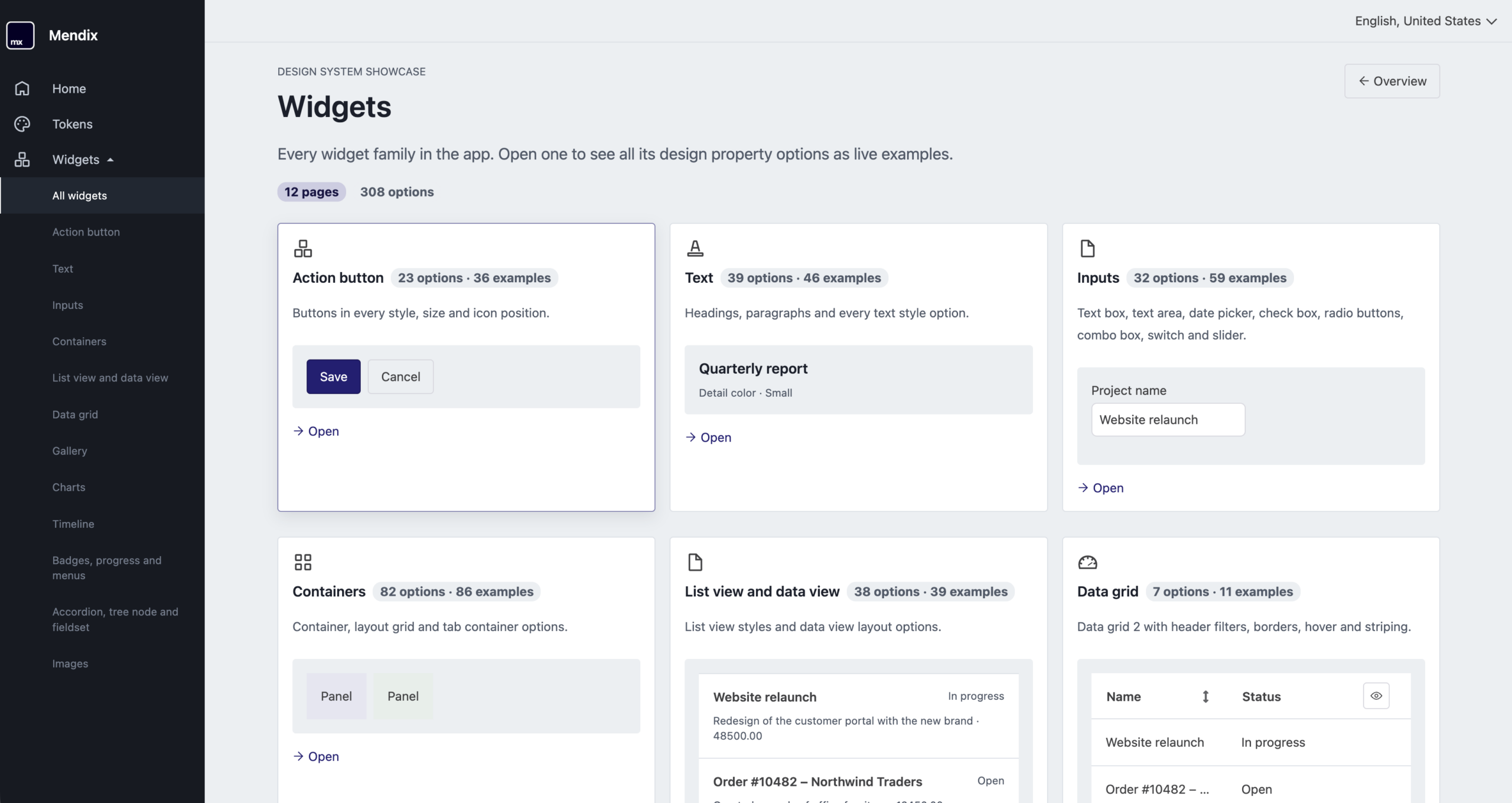
Atlas Core 4.6 gives every app a modern, professional look out of the box. The updated look keeps pages calm and neutral and uses your brand color where it matters. The navigation is reworked to match: a dark primary bar, a light secondary bar, your app’s logo and name in the header, and a tidier sidebar. Theming is simper too. A handful of variables restyle the navigation, and the colors stay readable together.
Maia builds on this. When you start a new app, Maia first proposes a few directions for its look, writes the theme and generates a logo, all before it builds the first page.
Upgrading? Values you’ve set in your theme stay as they are. The Atlas Core 4.6 release notes cover everything that changed and how to keep the current look.
Enterprise-grade platform
See what’s happening in your app without opening a log file
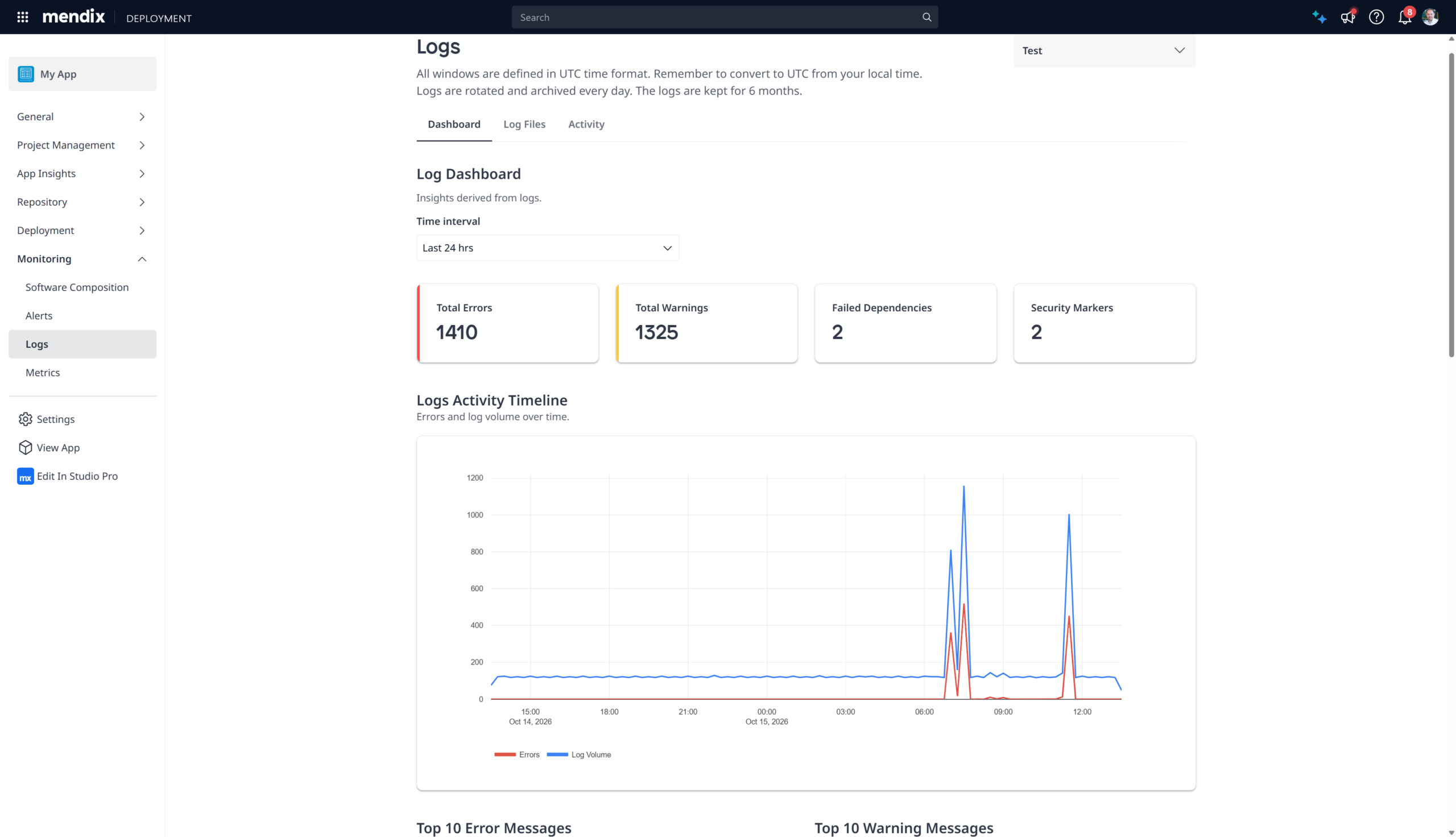
When something goes wrong in a Mendix Cloud application, the first question is always the same: what’s actually happening in there? The new Log Insights Dashboard gives you an immediate answer. It’s the default view when you open the Logs page for any environment, turning your application’s log data into a set of clearly readable sections. No file downloads, no manual sifting required!
The dashboard surfaces the insights that matter most for understanding your app’s health: error and warning trends over time, the most frequently occurring messages, endpoints with high error rates, dependency failures, and security markers. Use the Time interval drop-down to look across the last six hours up to the last seven days. If you want all to dive deeper into the log files, they’re still there on the Log Files tab.
The dashboard is available now in the Mendix Portal for all environments. Navigate to your app, open Monitoring > Logs, and the Dashboard tab is the first thing you’ll see.
Self-service database bloat
Reclaim database disk space on Mendix Cloud
PostgreSQL keeps old versions of updated and deleted rows around to support concurrent reads, a mechanism called Multi-Version Concurrency Control (MVCC). Over time, these “dead tuples” accumulate and cause table bloat: disk usage climbs, query performance degrades, and indexes slow down. On Mendix Cloud, we run autovacuum on all PostgreSQL databases, which keeps bloat under control for the vast majority of applications. For a limited subset of apps, though, autovacuum can’t keep up: typically, applications with a high number of transactions that create, update, and delete large amounts of database records. For those apps, bloat can become a real problem.
Recently, we gave you the metrics to see when your database is bloated. Now you can act on it. A new Repack button in the Plan Details section of your Environment Details page lets you reclaim bloated disk space with a single click, directly from the Developer Portal, without involving Support.
Under the hood, Repack uses pg_repack, a PostgreSQL extension that rebuilds tables and indexes without holding exclusive locks. UnlikeVACUUM FULL, which locks tables and effectively takes your app offline for the duration, pg_repack works online. Your application stays running throughout the process.
What this means for you
If the bloat ratio metrics show a problem, you no longer need to file a support ticket and wait. Open your environment’s Plan Details and click Repack: you can choose to run it immediately or schedule it for a later time. While the expected impact on your running application is minimal, the option to schedule gives you full control over when it happens. After repacking, your disk usage will reflect only the live data, and your database performance should improve.
Check out the documentation and find the Repack button under Plan Details in your Mendix Cloud environment.
Forward HTTP access logs to your APM tool via OpenTelemetry
Mendix Cloud’s OpenTelemetry integration already lets you export application logs, metrics and traces to any compatible APM backend. With this release, you can now include HTTP access logs as well.
Access logs originate from the ingress layer and capture every inbound HTTP request: the target path, source IP address, HTTP response code and response time. Previously, you couldn’t ingest this information into your APM tool with our OpenTelemetry integration. Now it is a single environment variable away.
To enable it, setMX_OTEL_ACCESS_LOGS_ENABLED=true on your environment. In your APM tool, these log lines will be tagged withlog_type: mx.accesslogs to separate them from application logs. Both log types also carry shared metadata — pod name, environment ID, runtime version — so you can correlate them easily.
What this means for you
With access logs in your APM tool, you can investigate where requests are coming from, which endpoints are returning errors, and what your response times look like, all without leaving your observability stack. It is especially useful for spotting traffic anomalies, diagnosing latency issues and auditing access patterns across your Mendix Cloud environments. You can use the insights from the access lots to set up access restrictions for your environments and secure your application further.
Check out the documentation and enable access log export under your environment’s custom environment variables.
Dynamic variables, now built right into your pipelines
Integrations rarely consist of entirely static values. A request URL may contain an environment-specific path, an authorization header may combine a fixed prefix with a token, and a request body may include values produced by an earlier pipeline step. Until now, configuring these patterns in Mendix Pipelines required developers to split request values across fields or place error-prone formatting inside variables.
We are making this easier. Developers can now combine plain text and variable references directly within supported POST and GET request inputs. A header can, for example, contain the static Bearer prefix followed by a token variable, while a URL can combine its fixed and dynamic parts in one place, or contain multiple variables that are concatenated. Variables can also be positioned where they are needed within request bodies and other supported request values.
This makes the complete request structure visible during its configuration. Developers no longer need to reconstruct a value from separate fields or inspect a variable to understand whether it contains additional formatting. This makes it easier and less error-prone to set up complex integrations between Mendix Pipelines and your external systems (like quality/security scanners or registries).
Enriched Marketplace data in Software Composition
Software Composition lists every component across your Mendix landscape, ranked by how many apps use it. Each component now carries its Marketplace data, including whether your company approved it. That turns a flat inventory into a work list. A component sitting in sixty apps with no approval carries more risk than one used once, and you can now tell the two apart without opening sixty projects. Review what your teams depend on most, then point developers to an approved alternative.
The same view carries your Mendix 12 preparation. Filter for Dojo components to see which apps need React replacements before Mendix 12 removes the Dojo client. Usage ranking tells you which replacement unblocks the most apps.
Manage guest access per component
You can now give external users download access to a single Marketplace component directly on that component. Guest access no longer has to go through a component group. You manage it on the component itself, choosing exactly who can download it.
Before this change, guest access was handled at the group level. A component could only belong to one company group, so sharing different components with different external parties ran into that one-group limit. Managing guests per component removes the limit. You decide per component which external users get download access, without arranging your components into groups first. It also sets the groundwork for more flexible ownership and sharing in the Marketplace.
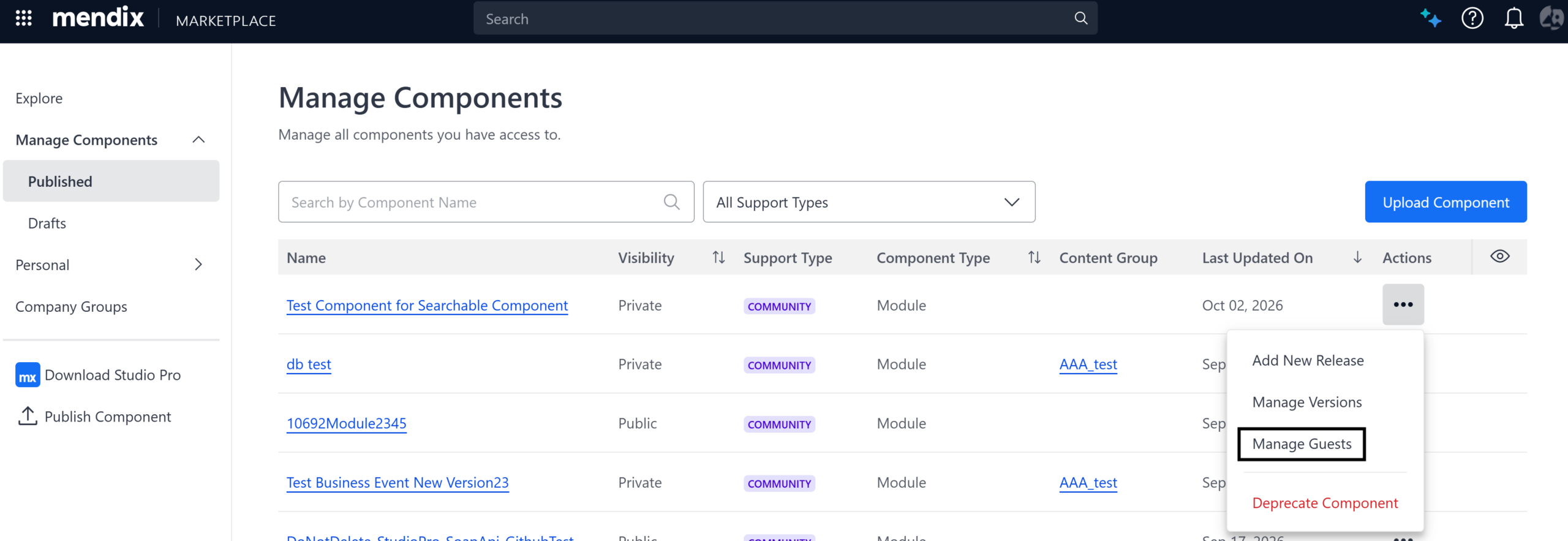
To add guests, open the component’s detail page or go to Manage Components, click the three dots, and select Manage Guests. Enter the people you want to give access to. You can add several at once. Each guest is notified that they have access, and the component then shows up in their Marketplace and on their Shared with me page.
If you already shared components with guests through component groups, those settings have been migrated for you. Your existing guests keep their access, and there is nothing to set up again.
Learning and certification
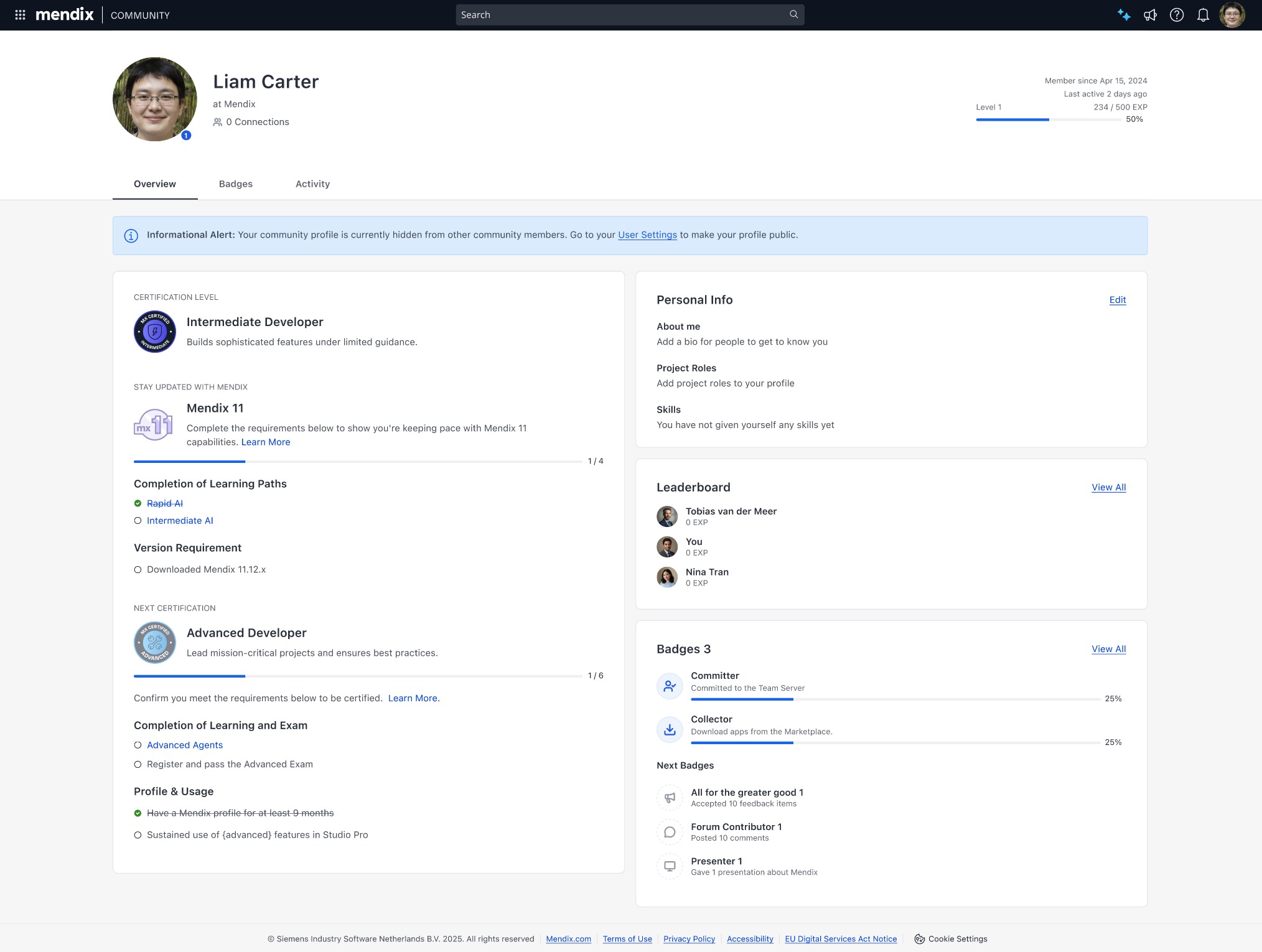
Mx 11 badge: Show you’re current, not just certified
A Mendix certificate shows that someone passed an exam, not that they still build with the platform today. Customers looking for partners and developers see big differences in capability between people holding the same certificate, and a certificate earned five years ago looks the same as one earned last month.
The Mx 11 badge is a first step towards closing that gap. It’s an add-on to the existing certification: developers earn it by completing the mandatory learning paths for their level, which cover the new AI capabilities in Mendix 11, and by working with Studio Pro 11. Once earned, the badge appears alongside their certification on their developer profile.
What to know
- One badge per level: There are separate badges for Rapid, Intermediate, Advanced and Expert, and developers can only earn the badge for a level they’re already certified at. A badge never makes someone look more senior than their certificate.
- Nothing changes for existing certificates: Exam registration and current certificates work as before.
- Clear next steps for developers: The developer profile shows exactly which actions are still open to earn the badge.
The badge went live on the 15th of October, and the Academy page now directs developers to their profile.
This is the first step. In January 2027 we’ll add more certification criteria next to passing the exam: learning path consumption, Studio Pro and platform activity, and how long a profile has existed. They start as indicators and become hard criteria after evaluation.
Siemens Xcelerator
The latest updates in Mendix Workstation
For developers building industrial applications, talking to local peripherals like serial ports, smart card readers, and printers has historically been an integration bottleneck. Since our General Availability launch, Mendix Workstation has been transforming how industrial applications interact with local peripheral hardware. By providing a clean, centralized architecture that links Mendix apps directly to local peripherals—from industrial printers to USB cameras and wedge scanners—Mendix Workstation eliminates the friction between cloud logic and physical hardware, giving your shop floor teams a fluid, responsive experience that keeps lines moving.
In our latest release, we’re expanding your hardware toolkit. Today, we are taking a look at the latest enhancements designed to give you deeper visibility, tighter control, and expanded hardware support for your shop floor operations.
What’s New Since GA
1. Wedge and Keyboard Emulator support
A massive win for standard shop floor workflows: Workstation now natively supports Wedge and Keyboard Emulator devices (such as standard barcode wedge scanners, calipers and specialized data entry keypads). Instead of requiring custom driver hooks, input data from these devices can be captured seamlessly by your Mendix application as if typed directly into the active field, dramatically accelerating data entry and minimizing operator errors.
2. Universal Printer Interface
Printing from the cloud should be as seamless as printing from a local desktop. The enhanced Printer Interface sits directly on top of the operating system’s printer management, allowing your Mendix applications to effortlessly utilize all printers managed by the OS. Whether you need to push documents to standard office printers or specialized thermal label printers on the line, you can now handle print jobs reliably without complex, device-specific custom drivers or clunky browser print dialogs.
3. Advanced Peripheral Support: USB Cameras and Webcams
Computer vision on the shop floor shouldn’t require complex external camera stacks. We are introducing the initial MVP for Camera Integration, enabling your Mendix applications to connect directly with local camera feeds. Out-of-the-box, this first version supports core shop floor tasks such as barcode detection and motion detection. While full data streaming is not supported at this stage, our upcoming roadmap includes advanced capabilities like defined Regions of Interest (ROI) and automatic snapshot capture for automated workflows and quality logging.
4. Workstation Starter App
Bootstrap new projects in record time with the new Workstation Starter App: a ready-to-use template with pre-wired must-have modules. It provides out-of-the-box reference structures and boilerplate setups, enabling developers to jump straight into building business logic rather than wiring up foundational connections.
5. Workstation Commons
To streamline development and maintain consistency across your applications, we’ve introduced Workstation Commons: a reusable core module for logging, UI snippets, and device utils. It provides standardized utilities that abstract away repetitive plumbing, keeping your portfolio clean, modular, and easy to maintain.
Core capabilities recap
If you’re new to Mendix Workstation, here is what powers your edge operations:
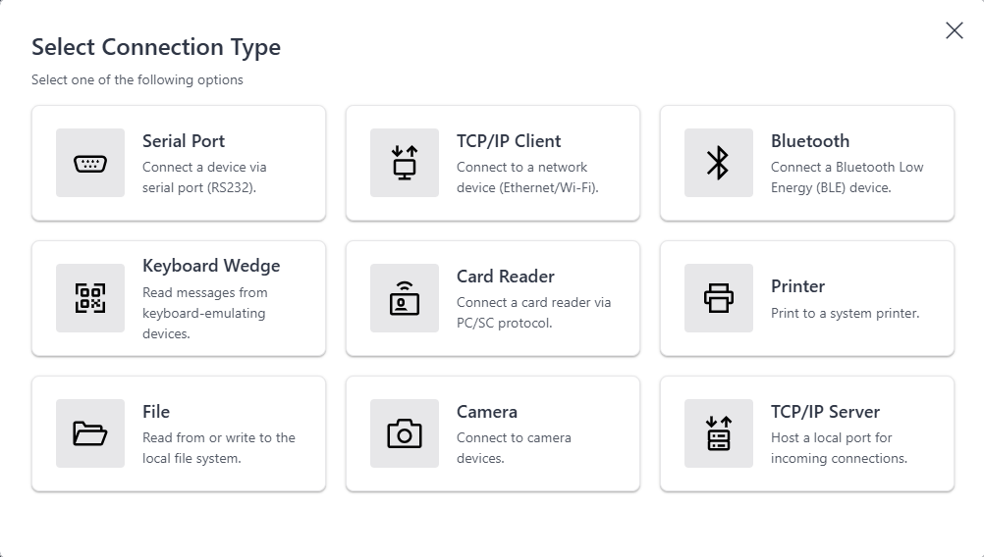
- Direct Local Hardware Access: Seamlessly communicate with Serial Ports (RS232), TCP-IP devices, Bluetooth LE, printers, card readers, cameras, and the local file system using standard Mendix nanoflows
- Centralized Management: Use the Workstation Management portal to register computers, monitor device lifecycles, and push configurations globally
Get started today
Ready to enhance your Mendix app with hardware capabilities? Head over to the Mendix Workstation Management or directly to the Marketplace to download the latest version of:
- Workstation Client
- Workstation Connector
- Starter App
- Workstation Commons module, and check out the official documentation for step-by-step configuration guides.
Got feedback or feature requests? Join the discussion on the Mendix Community Forum and let us know what shop floor challenges you’re solving next!
Designcenter X Cloud Services Connector
We are excited to announce the new Designcenter X Cloud Services Connector. So, what is it exactly?
The connector gives users seamless access to certain Designcenter X Cloud Services directly through the Mendix platform. This means teams can query CAD parts and objects, things like 3D geometry, materials, and PMI data, run collision detection calculations, and even schedule bulk compute jobs on large assemblies. And because it’s built as a dedicated Mendix connector, it comes with seamless authentication out of the box, and can be combined with other components like the Siemens Teamcenter Connector and 3D Viewer for a truly composable experience.
Why does this matter? Three key reasons:
- Speed to value: Teams can build CAD data-powered applications much faster, with the flexibility to deploy in the way that suits their environment best.
- Business user empowerment: Domain experts such as engineers, operations leads, or product specialists can build their own custom reporting apps and workflows without relying heavily on IT or development teams.
- Enterprise integration: The connector doesn’t work in isolation. It allows organizations to blend CAD data with other tools already in their IT landscape, automate workflows, and run advanced analytics, making CAD data a true part of the broader digital ecosystem.
Ready to transform your next idea into an app?
- Kickstart your project by structuring your vision with Maia Plan.
- Download Mendix Studio Pro and use Maia Make to turn your plan into an app.
- Take a closer look at all the features, improvements, fixes, and more in the Mendix 11.16 release notes.
- Don’t want to miss future updates? Subscribe to our blog to catch the latest news